<?xml version="1.0" encoding="utf-8"?><feed xmlns="http://www.w3.org/2005/Atom" ><generator uri="https://jekyllrb.com/" version="4.4.1">Jekyll</generator><link href="https://www.creekservice.org/feed.xml" rel="self" type="application/atom+xml" /><link href="https://www.creekservice.org/" rel="alternate" type="text/html" /><updated>2026-06-02T04:08:27+00:00</updated><id>https://www.creekservice.org/feed.xml</id><title type="html">Creek Service, write business logic, not boilerplate</title><subtitle>Quickly build &amp; test an ecosystem of JVM based microservices, using Kafka clients, Kafka Streams and more.</subtitle><author><name>Andy Coates</name></author><entry><title type="html">v0.4.4 preview release is available</title><link href="https://www.creekservice.org/releases/2026/04/28/v0.4.4-released.html" rel="alternate" type="text/html" title="v0.4.4 preview release is available" /><published>2026-04-28T00:00:00+00:00</published><updated>2026-04-28T18:39:28+00:00</updated><id>https://www.creekservice.org/releases/2026/04/28/v0.4.4-released</id><content type="html" xml:base="https://www.creekservice.org/releases/2026/04/28/v0.4.4-released.html"><![CDATA[<p>The v0.4.4 release of Creek is now publicly available on Maven Central and the Gradle plugin portal.</p>

<p>This release brings several significant improvements across the Creek ecosystem.</p>

<h3 id="breaking-changes">Breaking Changes</h3>

<ul>
  <li><strong>Java 17 required</strong>: Creek now requires Java 17 as a minimum. Java 11 is no longer supported.
    <ul>
      <li>(Kafka): 🛠 <a href="https://github.com/creek-service/creek-kafka/pull/855" target="_blank">Upgrade Java 11 to 17 <i class="fas fa-external-link-alt"></i></a></li>
      <li>(Service): 🛠 <a href="https://github.com/creek-service/creek-service/pull/455" target="_blank">Upgrade Java 11 to 17 <i class="fas fa-external-link-alt"></i></a></li>
      <li>(System Test): 🛠 <a href="https://github.com/creek-service/creek-system-test/pull/681" target="_blank">Upgrade Java 11 to 17 <i class="fas fa-external-link-alt"></i></a></li>
    </ul>
  </li>
</ul>

<h3 id="new-features">New Features</h3>

<ul>
  <li>(Kafka): 🎉 <a href="https://github.com/creek-service/creek-kafka/pull/459" target="_blank">Basic JSON Schema Serde <i class="fas fa-external-link-alt"></i></a> — Creek now supports JSON Schema-based serialization/deserialization for Kafka topics.</li>
  <li>(Kafka): 🎉 <a href="https://github.com/creek-service/creek-kafka/pull/485" target="_blank">Support loading schemas from another JPMS module <i class="fas fa-external-link-alt"></i></a></li>
  <li>(Kafka): 🎉 <a href="https://github.com/creek-service/creek-kafka/pull/474" target="_blank">Provide way for users to register subtypes <i class="fas fa-external-link-alt"></i></a></li>
  <li>(Kafka): 🎉 <a href="https://github.com/creek-service/creek-kafka/pull/863" target="_blank">Update Confluent Docker images to v3.x with KRaft <i class="fas fa-external-link-alt"></i></a> — moves away from ZooKeeper-based Kafka.</li>
  <li>(Service): 🎉 <a href="https://github.com/creek-service/creek-service/pull/257" target="_blank">Support nested resources <i class="fas fa-external-link-alt"></i></a></li>
  <li>(Service): 🎉 <a href="https://github.com/creek-service/creek-service/pull/245" target="_blank">Closeable context and extensions <i class="fas fa-external-link-alt"></i></a></li>
  <li>(System Test): 🎉 <a href="https://github.com/creek-service/creek-system-test/pull/694" target="_blank">Container starting hook <i class="fas fa-external-link-alt"></i></a></li>
  <li>(System Test): 🎉 <a href="https://github.com/creek-service/creek-system-test/pull/378" target="_blank">Initialize extensions per-suite and prepare resources <i class="fas fa-external-link-alt"></i></a></li>
</ul>

<h3 id="bug-fixes">Bug Fixes</h3>

<ul>
  <li>(Kafka): :beetle: <a href="https://github.com/creek-service/creek-kafka/pull/475" target="_blank">Improve temporal handling <i class="fas fa-external-link-alt"></i></a></li>
  <li>(System Test): :beetle: <a href="https://github.com/creek-service/creek-system-test/pull/380" target="_blank">Expose parser location <i class="fas fa-external-link-alt"></i></a></li>
  <li>(System Test): :beetle: <a href="https://github.com/creek-service/creek-system-test/pull/682" target="_blank">Replace deprecated test container mount usage <i class="fas fa-external-link-alt"></i></a></li>
</ul>

<p>The full release notes are available on GitHub:</p>
<ul>
  <li><a href="https://github.com/creek-service/creek-kafka/releases/tag/v0.4.4" target="_blank">creek-kafka v0.4.4 <i class="fas fa-external-link-alt"></i></a></li>
  <li><a href="https://github.com/creek-service/creek-service/releases/tag/v0.4.4" target="_blank">creek-service v0.4.4 <i class="fas fa-external-link-alt"></i></a></li>
  <li><a href="https://github.com/creek-service/creek-system-test/releases/tag/v0.4.4" target="_blank">creek-system-test v0.4.4 <i class="fas fa-external-link-alt"></i></a></li>
</ul>]]></content><author><name>Andy Coates</name></author><category term="releases" /><category term="dependencies" /><category term="kafka" /><category term="system-test" /><category term="json-schema" /><summary type="html"><![CDATA[We're proud to announce the v0.4.4 preview release of Creek. This release upgrades to Java 17, adds JSON Schema Serde support, and includes numerous dependency updates and bug fixes.]]></summary></entry><entry><title type="html">Shared schema: when to use and when _not_ to</title><link href="https://www.creekservice.org/articles/2025/09/10/shared-schema.html" rel="alternate" type="text/html" title="Shared schema: when to use and when _not_ to" /><published>2025-09-10T00:00:00+00:00</published><updated>2025-09-17T15:00:04+00:00</updated><id>https://www.creekservice.org/articles/2025/09/10/shared-schema</id><content type="html" xml:base="https://www.creekservice.org/articles/2025/09/10/shared-schema.html"><![CDATA[<p>There are challenges when it comes to sharing schemas and data across architectural or organisational boundaries.
In this post, we’ll look at the cost and potential pitfalls and come up with guidelines for when to use shared schema, and when not to.</p>

<h2 id="what-is-a-shared-schema">What is a shared schema?</h2>

<p>In the context of this post, a shared schema is one used in multiple places, it is not a schema that’s been shared to allow others to read data using it.</p>

<p>This post will focus on how to share schemas between <em>data products</em>. 
However, for those not defining data products, the principles are equally applicable to sharing schemas across other architectural or organisational boundaries.
For example, sharing schema across different data-sets, or between teams, departments, companies, etc.</p>

<p class="notice--info">A <em>data product</em> is a curated set of data, that conforms to a known schema, which others can consume.
The schemas of the product define a data-contract: an defined API, but for data, not code.
Thinking of your data in terms of being a product is a key principle of building a Data Mesh.</p>

<p>When it comes to sharing a schema, these are two main questions to consider:</p>
<ol>
  <li><strong>evolution</strong>: does the schema change over time?</li>
  <li><strong>ownership</strong>: who is responsible for maintaining the schema and its evolution?</li>
</ol>

<h2 id="tldr">tl;dr</h2>

<p>For those just looking for the juice, here are some quick guidelines around using shared schema:</p>

<table>
  <thead>
    <tr>
      <th>Schema you’d like to embed</th>
      <th>Recommendation</th>
      <th>Example</th>
    </tr>
  </thead>
  <tbody>
    <tr>
      <td>Someone else’s identifier / key schema</td>
      <td>✅ - not a problem</td>
      <td>A <code class="language-plaintext highlighter-rouge">UserId</code>, a <code class="language-plaintext highlighter-rouge">ProductId</code>, etc. Think primary key columns in a DB, both single or multiple fields. OK to share as they don’t evolve/change.</td>
    </tr>
    <tr>
      <td>Someone else’s object / value schema</td>
      <td>❌ - avoid like the plague</td>
      <td>A full, rich <code class="language-plaintext highlighter-rouge">User</code> or <code class="language-plaintext highlighter-rouge">Product</code> object. The schema is highly likely to evolve/change, which causes many issues.</td>
    </tr>
    <tr>
      <td>Common value types with a stable schema</td>
      <td>✅ - but, tread carefully</td>
      <td><code class="language-plaintext highlighter-rouge">Currency</code>, <code class="language-plaintext highlighter-rouge">Country</code>, <code class="language-plaintext highlighter-rouge">EmailAddress</code>, etc. Think simple, common types, not provided by the schema implementation by default. OK to share as long as they don’t evolve/change.</td>
    </tr>
    <tr>
      <td>Your own schema</td>
      <td>✅ - not a problem</td>
      <td>Do as you like, share them, evolve them, remove them. As long as its evolvable.</td>
    </tr>
  </tbody>
</table>

<h2 id="an-example-scenario">An example scenario</h2>

<p>Let’s say we have a team, doing the right thing and producing a <code class="language-plaintext highlighter-rouge">Users</code> <em>data product</em>, containing the attributes of the company’s users.</p>

<p>This team, being good engineers, knows it needs to ensure changes to the schemas are fully evolvable, so that changes don’t break downstream consumers of the data.</p>

<p>For the sake of example, let’s say the <code class="language-plaintext highlighter-rouge">Users</code> schema is something basic, like the following Avro schema:</p>

<div class="language-json highlighter-rouge"><div class="highlight"><pre class="highlight"><code><span class="p">{</span><span class="w">
  </span><span class="nl">"type"</span><span class="p">:</span><span class="w"> </span><span class="s2">"record"</span><span class="p">,</span><span class="w">
  </span><span class="nl">"name"</span><span class="p">:</span><span class="w"> </span><span class="s2">"User"</span><span class="p">,</span><span class="w">
  </span><span class="nl">"namespace"</span><span class="p">:</span><span class="w"> </span><span class="s2">"acme.users"</span><span class="p">,</span><span class="w">
  </span><span class="nl">"fields"</span><span class="p">:</span><span class="w"> </span><span class="p">[</span><span class="w">
    </span><span class="p">{</span><span class="w">
      </span><span class="nl">"name"</span><span class="p">:</span><span class="w"> </span><span class="s2">"userId"</span><span class="p">,</span><span class="w">
      </span><span class="nl">"type"</span><span class="p">:</span><span class="w"> </span><span class="s2">"long"</span><span class="w">
    </span><span class="p">},</span><span class="w">
    </span><span class="p">{</span><span class="w">
      </span><span class="nl">"name"</span><span class="p">:</span><span class="w"> </span><span class="s2">"fullName"</span><span class="p">,</span><span class="w">
      </span><span class="nl">"type"</span><span class="p">:</span><span class="w"> </span><span class="s2">"string"</span><span class="w">
    </span><span class="p">},</span><span class="w">
    </span><span class="p">{</span><span class="w">
      </span><span class="nl">"name"</span><span class="p">:</span><span class="w"> </span><span class="s2">"residentialAddress"</span><span class="p">,</span><span class="w">
      </span><span class="nl">"type"</span><span class="p">:</span><span class="w"> </span><span class="s2">"Address"</span><span class="w">
    </span><span class="p">}</span><span class="w">
  </span><span class="p">]</span><span class="w">
</span><span class="p">}</span><span class="w">
</span></code></pre></div></div>

<p>With a simple <code class="language-plaintext highlighter-rouge">Address</code> type:</p>

<div class="language-json highlighter-rouge"><div class="highlight"><pre class="highlight"><code><span class="p">{</span><span class="w">
  </span><span class="nl">"type"</span><span class="p">:</span><span class="w"> </span><span class="s2">"record"</span><span class="p">,</span><span class="w">
  </span><span class="nl">"name"</span><span class="p">:</span><span class="w"> </span><span class="s2">"Address"</span><span class="p">,</span><span class="w">
  </span><span class="nl">"namespace"</span><span class="p">:</span><span class="w"> </span><span class="s2">"acme.users"</span><span class="p">,</span><span class="w">
  </span><span class="nl">"fields"</span><span class="p">:</span><span class="w"> </span><span class="p">[</span><span class="w">
    </span><span class="p">{</span><span class="w">
      </span><span class="nl">"name"</span><span class="p">:</span><span class="w"> </span><span class="s2">"line1"</span><span class="p">,</span><span class="w">
      </span><span class="nl">"type"</span><span class="p">:</span><span class="w"> </span><span class="s2">"string"</span><span class="w">
    </span><span class="p">},</span><span class="w">
    </span><span class="p">{</span><span class="w">
      </span><span class="nl">"name"</span><span class="p">:</span><span class="w"> </span><span class="s2">"line2"</span><span class="p">,</span><span class="w">
      </span><span class="nl">"type"</span><span class="p">:</span><span class="w"> </span><span class="s2">"string"</span><span class="w">
    </span><span class="p">},</span><span class="w">
    </span><span class="p">{</span><span class="w">
      </span><span class="nl">"name"</span><span class="p">:</span><span class="w"> </span><span class="s2">"postCode"</span><span class="p">,</span><span class="w">
      </span><span class="nl">"type"</span><span class="p">:</span><span class="w"> </span><span class="s2">"string"</span><span class="w">
    </span><span class="p">}</span><span class="w">
  </span><span class="p">]</span><span class="w">
</span><span class="p">}</span><span class="w">
</span></code></pre></div></div>

<p>For example, a <code class="language-plaintext highlighter-rouge">User</code> may look like:</p>

<div class="language-json highlighter-rouge"><div class="highlight"><pre class="highlight"><code><span class="p">{</span><span class="w">
  </span><span class="nl">"userId"</span><span class="p">:</span><span class="w"> </span><span class="mi">257363658353</span><span class="p">,</span><span class="w">
  </span><span class="nl">"fullName"</span><span class="p">:</span><span class="w"> </span><span class="s2">"Miss Emily Stewart"</span><span class="p">,</span><span class="w">
  </span><span class="nl">"residentialAddress"</span><span class="p">:</span><span class="w"> </span><span class="p">{</span><span class="w">
    </span><span class="nl">"line1"</span><span class="p">:</span><span class="w"> </span><span class="s2">"13 Main Street"</span><span class="p">,</span><span class="w">
    </span><span class="nl">"line2"</span><span class="p">:</span><span class="w"> </span><span class="s2">"London"</span><span class="p">,</span><span class="w">
    </span><span class="nl">"postCode"</span><span class="p">:</span><span class="w"> </span><span class="s2">"SW13 6JF"</span><span class="w">    
  </span><span class="p">}</span><span class="w">
</span><span class="p">}</span><span class="w">
</span></code></pre></div></div>

<p>A less experienced team is responsible for creating an <code class="language-plaintext highlighter-rouge">OpenOrders</code> data product, containing all the open orders a user has placed.</p>

<p>This team, being kind souls and knowing that many downstream teams will need to know the details of the users who’ve placed the orders, <em>denormalises</em> the user details into their data.</p>

<p>For the sake of example, let’s say the <code class="language-plaintext highlighter-rouge">OpenOrders</code> schema is something basic, like the following Avro schema:</p>

<div class="language-json highlighter-rouge"><div class="highlight"><pre class="highlight"><code><span class="p">{</span><span class="w">
  </span><span class="nl">"type"</span><span class="p">:</span><span class="w"> </span><span class="s2">"record"</span><span class="p">,</span><span class="w">
  </span><span class="nl">"name"</span><span class="p">:</span><span class="w"> </span><span class="s2">"OpenOrder"</span><span class="p">,</span><span class="w">
  </span><span class="nl">"namespace"</span><span class="p">:</span><span class="w"> </span><span class="s2">"acme.orders"</span><span class="p">,</span><span class="w">
  </span><span class="nl">"fields"</span><span class="p">:</span><span class="w"> </span><span class="p">[</span><span class="w">
    </span><span class="p">{</span><span class="w">
      </span><span class="nl">"name"</span><span class="p">:</span><span class="w"> </span><span class="s2">"orderId"</span><span class="p">,</span><span class="w">
      </span><span class="nl">"type"</span><span class="p">:</span><span class="w"> </span><span class="s2">"long"</span><span class="w">
    </span><span class="p">},</span><span class="w">
    </span><span class="p">{</span><span class="w">
      </span><span class="nl">"name"</span><span class="p">:</span><span class="w"> </span><span class="s2">"user"</span><span class="p">,</span><span class="w">
      </span><span class="nl">"type"</span><span class="p">:</span><span class="w"> </span><span class="s2">"acme.users.User"</span><span class="w">
    </span><span class="p">},</span><span class="w">
    </span><span class="p">{</span><span class="w">
      </span><span class="nl">"name"</span><span class="p">:</span><span class="w"> </span><span class="s2">"items"</span><span class="p">,</span><span class="w">
      </span><span class="nl">"type"</span><span class="p">:</span><span class="w"> </span><span class="p">{</span><span class="w">
        </span><span class="nl">"type"</span><span class="p">:</span><span class="w"> </span><span class="s2">"array"</span><span class="p">,</span><span class="w">
        </span><span class="nl">"items"</span><span class="p">:</span><span class="w"> </span><span class="s2">"OrderItem"</span><span class="w">
      </span><span class="p">}</span><span class="w">
    </span><span class="p">}</span><span class="w">
  </span><span class="p">]</span><span class="w">
</span><span class="p">}</span><span class="w">
</span></code></pre></div></div>

<p>An order placed by Emily may look like:</p>

<div class="language-json highlighter-rouge"><div class="highlight"><pre class="highlight"><code><span class="p">{</span><span class="w">
    </span><span class="nl">"orderId"</span><span class="p">:</span><span class="w"> </span><span class="mi">123456789012</span><span class="p">,</span><span class="w">
    </span><span class="nl">"user"</span><span class="p">:</span><span class="w"> </span><span class="p">{</span><span class="w">
      </span><span class="nl">"userId"</span><span class="p">:</span><span class="w"> </span><span class="mi">257363658353</span><span class="p">,</span><span class="w">
      </span><span class="nl">"fullName"</span><span class="p">:</span><span class="w"> </span><span class="s2">"Miss Emily Stewart"</span><span class="p">,</span><span class="w">
      </span><span class="nl">"residentialAddress"</span><span class="p">:</span><span class="w"> </span><span class="p">{</span><span class="w">
        </span><span class="nl">"line1"</span><span class="p">:</span><span class="w"> </span><span class="s2">"13 Main Street"</span><span class="p">,</span><span class="w">
        </span><span class="nl">"line2"</span><span class="p">:</span><span class="w"> </span><span class="s2">"London"</span><span class="p">,</span><span class="w">
        </span><span class="nl">"postCode"</span><span class="p">:</span><span class="w"> </span><span class="s2">"SW13 6JF"</span><span class="w">
      </span><span class="p">}</span><span class="w">
    </span><span class="p">},</span><span class="w">
    </span><span class="nl">"items"</span><span class="p">:</span><span class="w"> </span><span class="p">[</span><span class="w">
        </span><span class="p">{</span><span class="w">
          </span><span class="nl">"productId"</span><span class="p">:</span><span class="w"> </span><span class="mi">123456789012</span><span class="p">,</span><span class="w">
          </span><span class="nl">"quantity"</span><span class="p">:</span><span class="w"> </span><span class="mi">1</span><span class="w">
        </span><span class="p">},</span><span class="w">
        </span><span class="p">{</span><span class="w">
          </span><span class="nl">"productId"</span><span class="p">:</span><span class="w"> </span><span class="mi">234567890123</span><span class="p">,</span><span class="w">
          </span><span class="nl">"quantity"</span><span class="p">:</span><span class="w"> </span><span class="mi">2</span><span class="w">
        </span><span class="p">}</span><span class="w">
    </span><span class="p">]</span><span class="w">
</span><span class="p">}</span><span class="w">
</span></code></pre></div></div>

<p>The <code class="language-plaintext highlighter-rouge">OpenOrder</code> schema references the <code class="language-plaintext highlighter-rouge">User</code> schema, allowing an instance of an <code class="language-plaintext highlighter-rouge">OpenOrder</code> to include the full set of the <code class="language-plaintext highlighter-rouge">User</code> attributes. This removes the burden on downstream teams of having to join these two data sets together.</p>

<p>At first glance, this may look like a good approach: do the join in one place, and it’s an approach many teams use when first starting to adopt schemas and data products.</p>

<h2 id="the-problem">The problem</h2>

<p>The use of the <code class="language-plaintext highlighter-rouge">User</code> schema, owned and managed by the first team, in the <code class="language-plaintext highlighter-rouge">OpenOrder</code> schema, owned and managed by the second team, is a code smell (data smell? schema smell?)
But why? You may ask!</p>

<h3 id="obese-data">Obese data</h3>

<p>The <code class="language-plaintext highlighter-rouge">User</code> schema in the example is tiny. A real-world example would have much more information.
By including the <code class="language-plaintext highlighter-rouge">User</code> in the <code class="language-plaintext highlighter-rouge">OpenOrder</code>, the size of an <code class="language-plaintext highlighter-rouge">OpenOrder</code> can drastically increase.</p>

<p>Yes, <em>some</em> downstream use cases may need <em>some</em> of this extra information, but by including it <em>everyone</em> needs to pay the price.</p>

<p>That’s higher network, cpu and memory utilisation, potentially increased storage costs and certainly slower deserialization and higher latency for all: Yay!</p>

<h3 id="stale-data">Stale data</h3>

<p>What happens when the <code class="language-plaintext highlighter-rouge">User</code> data changes? Maybe Emily moves home, or gets married and changes her name. Now all of Emily’s open orders are stale, containing incorrect information.</p>

<p>Either downstream teams are working with stale data (and let’s assume we all agree that’s bad!), or the <code class="language-plaintext highlighter-rouge">OpenOrder</code> data needs republishing when the <code class="language-plaintext highlighter-rouge">User</code> data changes.</p>

<p>The republishing requires extra application complexity: rather than just <em>joining</em> to the user data, it now needs to subscribe for changes too.</p>

<p>Republishing increases the rate at which the data changes, meaning <em>more</em> data needs moving around and consumed by downstream teams.</p>

<p>That’s higher network, cpu and memory utilisation, potentially increased storage costs and certainly slower deserialization and higher latency for all: Yay!</p>

<h3 id="stale-schema">Stale schema</h3>

<p>In a well-engineered system, with correct use of shared schema, a team consuming a data product need not worry about keeping up with the latest version of the product’s schema.
The only time they need to update their dependencies is when <em>there is something they need</em> in a later version.</p>

<p>It’s perfectly fine for a consuming team to use an old schema for as long as they like. 
(Full schema compatibility ensures all the data is compatible with their version of the schema.)</p>

<p>In this idyllic utopia, the schema and the data-contract they represent <em>decouple</em> data producers and consumers.</p>

<p>When the <code class="language-plaintext highlighter-rouge">User</code> schema was embedded into the <code class="language-plaintext highlighter-rouge">OpenOrder</code> schema, it increased coupling between the two teams and products.
The <code class="language-plaintext highlighter-rouge">OpenOrder</code> schema references a specific version of the <code class="language-plaintext highlighter-rouge">User</code> schema. 
When the <code class="language-plaintext highlighter-rouge">User</code> schema changes, it needs explicitly updating in the <code class="language-plaintext highlighter-rouge">OpenOrder</code> schema, otherwise the user data embedded in the <code class="language-plaintext highlighter-rouge">OpenOrder</code> can be incomplete.</p>

<p>To demonstrate this, imagine a downstream consumer of the <code class="language-plaintext highlighter-rouge">OpenOrder</code> data responsible for delivering orders to customers. Consider what happens when a new optional <code class="language-plaintext highlighter-rouge">deliveryAddress</code> field is added to the <code class="language-plaintext highlighter-rouge">User</code> schema. 
The delivery system is updated to the latest <code class="language-plaintext highlighter-rouge">User</code> schema and enhanced to route orders to the <code class="language-plaintext highlighter-rouge">deliveryAddress</code> where it’s present. Job done, and everyone can go home early, right?</p>

<p>Alas no! Unless the <code class="language-plaintext highlighter-rouge">OpenOrder</code> schema is updated to embed the latest <code class="language-plaintext highlighter-rouge">User</code> data, orders will continue to be delivered to the <code class="language-plaintext highlighter-rouge">residentialAddress</code>, because <code class="language-plaintext highlighter-rouge">OpenOrder</code> won’t include the <code class="language-plaintext highlighter-rouge">deliveryAddress</code>.</p>

<p>A change that should have only involved a change to the <code class="language-plaintext highlighter-rouge">User</code> product and the delivery system now requires a change to the <code class="language-plaintext highlighter-rouge">OpenOrder</code> product too.</p>

<p>That’s unnecessary and avoidable coupling!</p>

<p>Note, adding the <code class="language-plaintext highlighter-rouge">deliveryAddress</code> field would make the <code class="language-plaintext highlighter-rouge">Address</code> schema a shared schema, i.e. used in multiple places.
However, using your own schema in this way is perfectly fine, as you control its evolution.</p>

<p class="notice--info">Defining your own shared schema for use <em>within</em> your own product is perfectly fine, as you control its evolution.</p>

<h2 id="a-good-approach">A good approach</h2>

<p>We’ve seen what not to do, so what should we do?</p>

<h3 id="dont-embed-reference">Don’t embed, reference</h3>

<p>As a general rule, don’t embed another product’s schema, or data, into your own: reference it instead.</p>

<p>Let’s rejig the <code class="language-plaintext highlighter-rouge">OpenOrder</code> schema to include a <em>reference</em> to the <code class="language-plaintext highlighter-rouge">User</code> data, i.e. just a <code class="language-plaintext highlighter-rouge">userId</code>, rather than <em>denormalising</em> it:</p>

<div class="language-json highlighter-rouge"><div class="highlight"><pre class="highlight"><code><span class="p">{</span><span class="w">
  </span><span class="nl">"type"</span><span class="p">:</span><span class="w"> </span><span class="s2">"record"</span><span class="p">,</span><span class="w">
  </span><span class="nl">"name"</span><span class="p">:</span><span class="w"> </span><span class="s2">"OpenOrder"</span><span class="p">,</span><span class="w">
  </span><span class="nl">"namespace"</span><span class="p">:</span><span class="w"> </span><span class="s2">"acme.orders"</span><span class="p">,</span><span class="w">
  </span><span class="nl">"fields"</span><span class="p">:</span><span class="w"> </span><span class="p">[</span><span class="w">
    </span><span class="p">{</span><span class="w">
      </span><span class="nl">"name"</span><span class="p">:</span><span class="w"> </span><span class="s2">"orderId"</span><span class="p">,</span><span class="w">
      </span><span class="nl">"type"</span><span class="p">:</span><span class="w"> </span><span class="s2">"long"</span><span class="w">
    </span><span class="p">},</span><span class="w">
    </span><span class="p">{</span><span class="w">
      </span><span class="nl">"name"</span><span class="p">:</span><span class="w"> </span><span class="s2">"userId"</span><span class="p">,</span><span class="w">
      </span><span class="nl">"type"</span><span class="p">:</span><span class="w"> </span><span class="s2">"long"</span><span class="w">
    </span><span class="p">},</span><span class="w">
    </span><span class="p">{</span><span class="w">
      </span><span class="nl">"name"</span><span class="p">:</span><span class="w"> </span><span class="s2">"items"</span><span class="p">,</span><span class="w">
      </span><span class="nl">"type"</span><span class="p">:</span><span class="w"> </span><span class="p">{</span><span class="w">
        </span><span class="nl">"type"</span><span class="p">:</span><span class="w"> </span><span class="s2">"array"</span><span class="p">,</span><span class="w">
        </span><span class="nl">"items"</span><span class="p">:</span><span class="w"> </span><span class="s2">"OrderItem"</span><span class="w">
      </span><span class="p">}</span><span class="w">
    </span><span class="p">}</span><span class="w">
  </span><span class="p">]</span><span class="w">
</span><span class="p">}</span><span class="w">
</span></code></pre></div></div>

<p>An order placed by Emily might now look like:</p>

<div class="language-json highlighter-rouge"><div class="highlight"><pre class="highlight"><code><span class="p">{</span><span class="w">
    </span><span class="nl">"orderId"</span><span class="p">:</span><span class="w"> </span><span class="mi">123456789012</span><span class="p">,</span><span class="w">
    </span><span class="nl">"userId"</span><span class="p">:</span><span class="w"> </span><span class="mi">257363658353</span><span class="p">,</span><span class="w">
    </span><span class="nl">"items"</span><span class="p">:</span><span class="w"> </span><span class="p">[</span><span class="w">
        </span><span class="p">{</span><span class="w">
          </span><span class="nl">"productId"</span><span class="p">:</span><span class="w"> </span><span class="mi">123456789012</span><span class="p">,</span><span class="w">
          </span><span class="nl">"quantity"</span><span class="p">:</span><span class="w"> </span><span class="mi">1</span><span class="w">
        </span><span class="p">},</span><span class="w">
        </span><span class="p">{</span><span class="w">
          </span><span class="nl">"productId"</span><span class="p">:</span><span class="w"> </span><span class="mi">234567890123</span><span class="p">,</span><span class="w">
          </span><span class="nl">"quantity"</span><span class="p">:</span><span class="w"> </span><span class="mi">2</span><span class="w">
        </span><span class="p">}</span><span class="w">
    </span><span class="p">]</span><span class="w">
</span><span class="p">}</span><span class="w">
</span></code></pre></div></div>

<p>That’s a much smaller payload! Downstream teams will thank you for it.
Downstream teams that need user data can join the order data to the user data, enriching it with just the <code class="language-plaintext highlighter-rouge">User</code> fields they require.</p>

<p>This leaves the <code class="language-plaintext highlighter-rouge">Users</code> data product as the source of truth for the user data, as it should be.</p>

<p>Of course, there are times when data needs to be denormalised for performance reasons.
That’s fine, but the scope of that data should be kept as small as possible, ideally as an implementation detail within a single team or system.
When sharing across an architectural or organisational boundary, such denormalisation should be avoided.</p>

<h3 id="just-the-right-amount-of-coupling">Just the right amount of coupling</h3>

<p>How much coupling is the right amount of coupling? Well, you might say it’s simple: a data product should:</p>
<ol>
  <li><em>never</em> use schemas defined by another data product, and</li>
  <li><em>never</em> include denormalised data from another data product</li>
</ol>

<p>While this is a good general position to start from, there are a few scenarios where it makes sense to break one or both of these rules. So let’s tone it down a bit:</p>

<p class="notice--info">As a good general position to start from, try to avoid referencing another product’s schemas or denormalising another product’s data in your own product. Where you do, consider the implications for you and consuming teams.</p>

<p>With some rough rules in place, let’s see about breaking them…</p>

<h4 id="lets-talk-about-keys">Let’s talk about keys.</h4>

<p>In the examples above, the <code class="language-plaintext highlighter-rouge">orderId</code> and <code class="language-plaintext highlighter-rouge">userId</code> fields are used to uniquely identify an order or user, respectively.</p>

<p>In database parlance, these identifiers would be primary <em>keys</em>.</p>

<p>The type of the keys in the above example are a simple <code class="language-plaintext highlighter-rouge">long</code>s, but that’s not always the case. 
Sometimes the keys are composites, i.e. made up of multiple fields, often other keys.</p>

<p>For example, an <code class="language-plaintext highlighter-rouge">OrderItem</code> might be uniquely identified by a combination of <code class="language-plaintext highlighter-rouge">orderId</code> and <code class="language-plaintext highlighter-rouge">productId</code>:</p>

<div class="language-json highlighter-rouge"><div class="highlight"><pre class="highlight"><code><span class="p">{</span><span class="w">
  </span><span class="nl">"type"</span><span class="p">:</span><span class="w"> </span><span class="s2">"record"</span><span class="p">,</span><span class="w">
  </span><span class="nl">"name"</span><span class="p">:</span><span class="w"> </span><span class="s2">"OrderItem"</span><span class="p">,</span><span class="w">
  </span><span class="nl">"namespace"</span><span class="p">:</span><span class="w"> </span><span class="s2">"acme.orders"</span><span class="p">,</span><span class="w">
  </span><span class="nl">"fields"</span><span class="p">:</span><span class="w"> </span><span class="p">[</span><span class="w">
    </span><span class="p">{</span><span class="w">
      </span><span class="nl">"name"</span><span class="p">:</span><span class="w"> </span><span class="s2">"orderId"</span><span class="p">,</span><span class="w">
      </span><span class="nl">"type"</span><span class="p">:</span><span class="w"> </span><span class="s2">"long"</span><span class="w">
    </span><span class="p">},</span><span class="w">
    </span><span class="p">{</span><span class="w">
      </span><span class="nl">"name"</span><span class="p">:</span><span class="w"> </span><span class="s2">"productId"</span><span class="p">,</span><span class="w">
      </span><span class="nl">"type"</span><span class="p">:</span><span class="w"> </span><span class="s2">"long"</span><span class="w">
    </span><span class="p">},</span><span class="w">
    </span><span class="p">{</span><span class="w">
      </span><span class="nl">"name"</span><span class="p">:</span><span class="w"> </span><span class="s2">"quantity"</span><span class="p">,</span><span class="w">
      </span><span class="nl">"type"</span><span class="p">:</span><span class="w"> </span><span class="s2">"int"</span><span class="w">
    </span><span class="p">}</span><span class="w">
  </span><span class="p">]</span><span class="w">
</span><span class="p">}</span><span class="w">
</span></code></pre></div></div>

<p>The thing about keys is that the set of fields they contain almost never change. 
Altering the set of fields is not an evolvable change, doing so would break systems that interact with the data.
In a well-engineered system, such a requirement would require a new data set to be curated with a <em>new</em> key schema, dual-published for some time, while systems were migrated.</p>

<p>As a key never changes, it’s the perfect candidate for being shared. Doing so can actually <em>improve</em> the readability, type-safety, and traceability of the data.</p>

<h5 id="simple-keys">Simple keys</h5>

<p>While it’s perfectly fine to leave simple ids like <code class="language-plaintext highlighter-rouge">userId</code> or <code class="language-plaintext highlighter-rouge">orderId</code> as simple <code class="language-plaintext highlighter-rouge">long</code>s, you may choose to create a custom type, for example this Avro schema:</p>

<div class="language-json highlighter-rouge"><div class="highlight"><pre class="highlight"><code><span class="p">{</span><span class="w">
  </span><span class="nl">"type"</span><span class="p">:</span><span class="w"> </span><span class="s2">"record"</span><span class="p">,</span><span class="w">
  </span><span class="nl">"name"</span><span class="p">:</span><span class="w"> </span><span class="s2">"UserId"</span><span class="p">,</span><span class="w">
  </span><span class="nl">"namespace"</span><span class="p">:</span><span class="w"> </span><span class="s2">"acme.users"</span><span class="p">,</span><span class="w">
  </span><span class="nl">"fields"</span><span class="p">:</span><span class="w"> </span><span class="p">[</span><span class="w">
    </span><span class="p">{</span><span class="w">
      </span><span class="nl">"name"</span><span class="p">:</span><span class="w"> </span><span class="s2">"id"</span><span class="p">,</span><span class="w">
      </span><span class="nl">"type"</span><span class="p">:</span><span class="w"> </span><span class="s2">"long"</span><span class="w">
    </span><span class="p">}</span><span class="w">
  </span><span class="p">]</span><span class="w">
</span><span class="p">}</span><span class="w">
</span></code></pre></div></div>

<p class="notice--warning">This use of an Avro record to represent the <code class="language-plaintext highlighter-rouge">id</code> of a <code class="language-plaintext highlighter-rouge">User</code> comes with a, albeit small, serialization cost!</p>

<p>If we also define an <code class="language-plaintext highlighter-rouge">OrderId</code> schema as:</p>

<div class="language-json highlighter-rouge"><div class="highlight"><pre class="highlight"><code><span class="p">{</span><span class="w">
  </span><span class="nl">"type"</span><span class="p">:</span><span class="w"> </span><span class="s2">"record"</span><span class="p">,</span><span class="w">
  </span><span class="nl">"name"</span><span class="p">:</span><span class="w"> </span><span class="s2">"OrderId"</span><span class="p">,</span><span class="w">
  </span><span class="nl">"namespace"</span><span class="p">:</span><span class="w"> </span><span class="s2">"acme.orders"</span><span class="p">,</span><span class="w">
  </span><span class="nl">"fields"</span><span class="p">:</span><span class="w"> </span><span class="p">[</span><span class="w">
    </span><span class="p">{</span><span class="w">
      </span><span class="nl">"name"</span><span class="p">:</span><span class="w"> </span><span class="s2">"id"</span><span class="p">,</span><span class="w">
      </span><span class="nl">"type"</span><span class="p">:</span><span class="w"> </span><span class="s2">"long"</span><span class="w">
    </span><span class="p">}</span><span class="w">
  </span><span class="p">]</span><span class="w">
</span><span class="p">}</span><span class="w">
</span></code></pre></div></div>

<p>Then we can update the <code class="language-plaintext highlighter-rouge">OpenOrder</code> schema to use these new key types:</p>

<div class="language-json highlighter-rouge"><div class="highlight"><pre class="highlight"><code><span class="p">{</span><span class="w">
  </span><span class="nl">"type"</span><span class="p">:</span><span class="w"> </span><span class="s2">"record"</span><span class="p">,</span><span class="w">
  </span><span class="nl">"name"</span><span class="p">:</span><span class="w"> </span><span class="s2">"OpenOrder"</span><span class="p">,</span><span class="w">
  </span><span class="nl">"namespace"</span><span class="p">:</span><span class="w"> </span><span class="s2">"acme.orders"</span><span class="p">,</span><span class="w">
  </span><span class="nl">"fields"</span><span class="p">:</span><span class="w"> </span><span class="p">[</span><span class="w">
    </span><span class="p">{</span><span class="w">
      </span><span class="nl">"name"</span><span class="p">:</span><span class="w"> </span><span class="s2">"orderId"</span><span class="p">,</span><span class="w">
      </span><span class="nl">"type"</span><span class="p">:</span><span class="w"> </span><span class="s2">"OrderId"</span><span class="w">
    </span><span class="p">},</span><span class="w">
    </span><span class="p">{</span><span class="w">
      </span><span class="nl">"name"</span><span class="p">:</span><span class="w"> </span><span class="s2">"userId"</span><span class="p">,</span><span class="w">
      </span><span class="nl">"type"</span><span class="p">:</span><span class="w"> </span><span class="s2">"acme.users.UserId"</span><span class="w">
    </span><span class="p">},</span><span class="w">
    </span><span class="p">{</span><span class="w">
      </span><span class="nl">"name"</span><span class="p">:</span><span class="w"> </span><span class="s2">"items"</span><span class="p">,</span><span class="w">
      </span><span class="nl">"type"</span><span class="p">:</span><span class="w"> </span><span class="p">{</span><span class="w">
        </span><span class="nl">"type"</span><span class="p">:</span><span class="w"> </span><span class="s2">"array"</span><span class="p">,</span><span class="w">
        </span><span class="nl">"items"</span><span class="p">:</span><span class="w"> </span><span class="s2">"OrderItem"</span><span class="w">
      </span><span class="p">}</span><span class="w">
    </span><span class="p">}</span><span class="w">
  </span><span class="p">]</span><span class="w">
</span><span class="p">}</span><span class="w">
</span></code></pre></div></div>

<p>Notice the <code class="language-plaintext highlighter-rouge">userId</code> field is of type <code class="language-plaintext highlighter-rouge">acme.users.UserId</code>. This is referencing a type from another data product. Gasp!
However, it’s OK, as the referenced type is a key and hence its schema won’t change.</p>

<p>Now, some readers may think wrapping primitives in a type is overkill.</p>

<p>They may well be right, though the types do make it easier to understand where the key is coming from and allow a simple <code class="language-plaintext highlighter-rouge">id</code> field name to be unambiguous,
and will provide a level of type-safety when working with the data in some languages.</p>

<p>Make your own judgment on the wrapped primitives.</p>

<h5 id="compound-keys">Compound keys</h5>

<p>Compound keys are a perfect candidate for being shared, as they make schema and code more readable than having multiple key fields everywhere.</p>

<p>For example, let’s define an <code class="language-plaintext highlighter-rouge">OrderItemId</code> schema as a combination of <code class="language-plaintext highlighter-rouge">orderId</code> and <code class="language-plaintext highlighter-rouge">productId</code>:</p>

<div class="language-json highlighter-rouge"><div class="highlight"><pre class="highlight"><code><span class="p">{</span><span class="w">
  </span><span class="nl">"type"</span><span class="p">:</span><span class="w"> </span><span class="s2">"record"</span><span class="p">,</span><span class="w">
  </span><span class="nl">"name"</span><span class="p">:</span><span class="w"> </span><span class="s2">"OrderItemId"</span><span class="p">,</span><span class="w">
  </span><span class="nl">"namespace"</span><span class="p">:</span><span class="w"> </span><span class="s2">"acme.orders"</span><span class="p">,</span><span class="w">
  </span><span class="nl">"fields"</span><span class="p">:</span><span class="w"> </span><span class="p">[</span><span class="w">
    </span><span class="p">{</span><span class="w">
      </span><span class="nl">"name"</span><span class="p">:</span><span class="w"> </span><span class="s2">"orderId"</span><span class="p">,</span><span class="w">
      </span><span class="nl">"type"</span><span class="p">:</span><span class="w"> </span><span class="s2">"OrderId"</span><span class="w">
    </span><span class="p">},</span><span class="w">
    </span><span class="p">{</span><span class="w">
      </span><span class="nl">"name"</span><span class="p">:</span><span class="w"> </span><span class="s2">"productId"</span><span class="p">,</span><span class="w">
      </span><span class="nl">"type"</span><span class="p">:</span><span class="w"> </span><span class="s2">"acme.products.productId"</span><span class="w">
    </span><span class="p">}</span><span class="w">
  </span><span class="p">]</span><span class="w">
</span><span class="p">}</span><span class="w">
</span></code></pre></div></div>

<p>Notice how the <code class="language-plaintext highlighter-rouge">productId</code> field of this key schema is referencing a key type from another data product.
As this is a stable key schema, its fine to share it.</p>

<p>With <code class="language-plaintext highlighter-rouge">OrderItemId</code> in place, an <code class="language-plaintext highlighter-rouge">OrderItem</code> schema can be defined as:</p>

<div class="language-json highlighter-rouge"><div class="highlight"><pre class="highlight"><code><span class="p">{</span><span class="w">
  </span><span class="nl">"type"</span><span class="p">:</span><span class="w"> </span><span class="s2">"record"</span><span class="p">,</span><span class="w">
  </span><span class="nl">"name"</span><span class="p">:</span><span class="w"> </span><span class="s2">"OrderItem"</span><span class="p">,</span><span class="w">
  </span><span class="nl">"namespace"</span><span class="p">:</span><span class="w"> </span><span class="s2">"acme.orders"</span><span class="p">,</span><span class="w">
  </span><span class="nl">"fields"</span><span class="p">:</span><span class="w"> </span><span class="p">[</span><span class="w">
    </span><span class="p">{</span><span class="w">
      </span><span class="nl">"name"</span><span class="p">:</span><span class="w"> </span><span class="s2">"id"</span><span class="p">,</span><span class="w">
      </span><span class="nl">"type"</span><span class="p">:</span><span class="w"> </span><span class="s2">"OrderItemId"</span><span class="w">
    </span><span class="p">},</span><span class="w">
    </span><span class="p">{</span><span class="w">
      </span><span class="nl">"name"</span><span class="p">:</span><span class="w"> </span><span class="s2">"quantity"</span><span class="p">,</span><span class="w">
      </span><span class="nl">"type"</span><span class="p">:</span><span class="w"> </span><span class="s2">"int"</span><span class="w">
    </span><span class="p">}</span><span class="w">
  </span><span class="p">]</span><span class="w">
</span><span class="p">}</span><span class="w">
</span></code></pre></div></div>

<h4 id="value-types">Value types</h4>

<p>Similar to keys, there is an argument for allowing simple ‘value’ types to be shared.</p>

<p>Maybe it makes sense in your company to have a <code class="language-plaintext highlighter-rouge">Currency</code> type that wraps an ISO currency code, or <code class="language-plaintext highlighter-rouge">Country</code> type that similarly wraps a ISO country code.
Both examples of a value type that wraps a single primitive field.</p>

<p>Maybe it would be nice to have a <code class="language-plaintext highlighter-rouge">Money</code> type, which combines a <code class="language-plaintext highlighter-rouge">currency</code> and <code class="language-plaintext highlighter-rouge">amount</code> field, or a <code class="language-plaintext highlighter-rouge">Date</code> type that wraps <code class="language-plaintext highlighter-rouge">year</code>, <code class="language-plaintext highlighter-rouge">month</code> and <code class="language-plaintext highlighter-rouge">day</code> fields.</p>

<p>Such shared schema can make life easier: easier to perform joins on a common type, easier transforming input data to create new products, etc.</p>

<p>However, it’s important to note that such types work great <em>until</em> their schema needs to change.
Then you have a challenge, potentially involving getting everyone to update at the same time and a coordinated system-wide release.
There’s that increased coupling again!</p>

<p class="notice--info">Common simple types can add lots of benefits, but only if their schema are stable.</p>

<p>Consider the implications if your company had a shared <code class="language-plaintext highlighter-rouge">Currency</code> enumeration and you needed to add a new value:
I’m not aware of any schema implementations, Avro, Proto, JSON, etc, where adding a value to a enumeration is an evolvable change…</p>

<p class="notice--warning">Enumerations make terrible shared types, because changing them is not an evolvable change.</p>

<p>So, if you’re going to use shared schema like these, choose wisely which types to share.</p>

<h2 id="in-conclusion">In conclusion…</h2>

<p>Hopefully, this post has given you some ideas on how to use shared schemas in your data products without creating problems for yourself down the road.</p>

<p>Before signing off, let’s have a reminder of the guidance from the beginning of this post and make it a little more data-product centric:</p>

<table>
  <thead>
    <tr>
      <th>Schema you’d like to use in your product</th>
      <th>Recommendation</th>
      <th>Example</th>
    </tr>
  </thead>
  <tbody>
    <tr>
      <td>Another product’s identifier / key schema</td>
      <td>✅: not a problem</td>
      <td>A <code class="language-plaintext highlighter-rouge">UserId</code> or <code class="language-plaintext highlighter-rouge">ProductId</code>, etc. Think primary key columns in a DB, both single or multiple fields. OK to share as they don’t evolve/change.</td>
    </tr>
    <tr>
      <td>Another product’s object / value schema</td>
      <td>❌: avoid like the plague</td>
      <td>A full, rich <code class="language-plaintext highlighter-rouge">User</code> or <code class="language-plaintext highlighter-rouge">Product</code> object. The schema is highly likely to evolve/change, which causes issues</td>
    </tr>
    <tr>
      <td>Common value types with a stable schema</td>
      <td>✅: but, tread carefully</td>
      <td><code class="language-plaintext highlighter-rouge">Currency</code> containing an ISO-4217 code, <code class="language-plaintext highlighter-rouge">EmailAddress</code> wrapping a string, etc. Think simple, common types, not provided by the schema implementation by default. OK to share as long as they don’t evolve/change.</td>
    </tr>
    <tr>
      <td>The product’s own schema</td>
      <td>✅: not a problem</td>
      <td>Do as you like, share them, evolve them, remove them. As long as its evolvable.</td>
    </tr>
  </tbody>
</table>

<p>Happy coding!</p>]]></content><author><name>Andy Coates</name></author><category term="articles" /><category term="kafka" /><category term="json" /><category term="json-schema" /><category term="avro" /><category term="schema" /><summary type="html"><![CDATA[Should multiple teams collaborate and use common shared schema? Should the output of one team's services include types defined in another? These are important questions, and getting them wrong can lead to a whole heap of pain down the road.]]></summary></entry><entry><title type="html">Evolving JSON Schemas - Part II</title><link href="https://www.creekservice.org/articles/2024/01/09/json-schema-evolution-part-2.html" rel="alternate" type="text/html" title="Evolving JSON Schemas - Part II" /><published>2024-01-09T00:00:00+00:00</published><updated>2024-01-12T23:39:52+00:00</updated><id>https://www.creekservice.org/articles/2024/01/09/json-schema-evolution-part-2</id><content type="html" xml:base="https://www.creekservice.org/articles/2024/01/09/json-schema-evolution-part-2.html"><![CDATA[<p>In the <a href="/articles/2024/01/08/json-schema-evolution-part-1.html">previous article</a> we looked at how Confluent’s Schema Registry’s 
compatability checks when evolving JSON schemas are so limiting as to be basically unusable, requiring the use of verbose
partially-open content models to map property names to specific types.
In this second and final part we’ll look at leveraging Confluent’s Schema Registry to build a more useful set of compatability checks, 
leading to a more user-friendly and clean evolution model, free from the noise of a partially-open content model.</p>

<h2 id="requirements-for-json-schema-evolution">Requirements for JSON schema evolution</h2>

<p>How should JSON Schema evolution work? What operations are required to mean we have a useful way to evolve schemas with <em>full</em> compatability?</p>

<p>What we’ve come to expect from other schema types, for example Avro, is that required properties can’t be removed if we want <em>forwards</em> compatibility,
or added if we want <em>backwards</em> compatibility. Confluent’s checks already cover this.</p>

<p>It’s the handling of optional properties that needs to change: adding and removing optional properties should be a <em>fully</em> compatible change, 
but are not supported by Confluent’s checks.</p>

<p>This gives us the following requirements in table form:</p>

<table>
  <thead>
    <tr>
      <th> </th>
      <th>Forward Compatible<br />Old schema / new data</th>
      <th>Backwards Compatible<br />New schema / old data</th>
      <th>Fully Compatible</th>
    </tr>
  </thead>
  <tbody>
    <tr>
      <td>Add required</td>
      <td>:heavy_check_mark:</td>
      <td>:x:</td>
      <td>:x:</td>
    </tr>
    <tr>
      <td>Add optional</td>
      <td>:heavy_check_mark:</td>
      <td>:heavy_check_mark:</td>
      <td>:heavy_check_mark:</td>
    </tr>
    <tr>
      <td>Remove required</td>
      <td>:x:</td>
      <td>:heavy_check_mark:</td>
      <td>:x:</td>
    </tr>
    <tr>
      <td>Remove optional</td>
      <td>:heavy_check_mark:</td>
      <td>:heavy_check_mark:</td>
      <td>:heavy_check_mark:</td>
    </tr>
    <tr>
      <td>Optional -&gt; required</td>
      <td>:heavy_check_mark:</td>
      <td>:x:</td>
      <td>:x:</td>
    </tr>
    <tr>
      <td>Required -&gt; Optional</td>
      <td>:x:</td>
      <td>:heavy_check_mark:</td>
      <td>:x:</td>
    </tr>
  </tbody>
</table>

<p>If JSON Schema compatability checks supported these operations it would be user-friendly and applicable to real-world use-cases.</p>

<h2 id="splitting-readers-and-writers">Splitting readers and writers</h2>

<p>So how can we achieve full compatibility when adding and removing optional fields?</p>

<p>Simple. We differentiate between the schemas used to produce the data from those used to consume the data.</p>

<p>Because producing schemas are never used to consume data, there is no requirement for producing schemas to be compatible with each other.
Likewise, there is no requirement for consuming schemas to be compatible with each other, as they never produce data.
All that matters is compatability between producing and consuming schemas.</p>

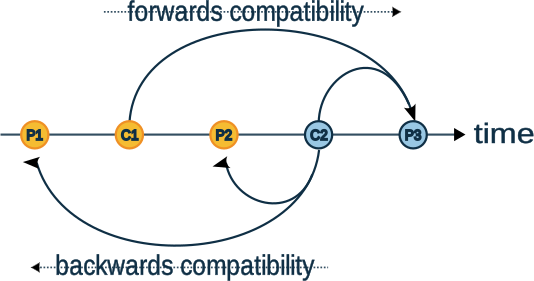
<p>The figure below shows how this would work when adding a new consuming schema <code class="language-plaintext highlighter-rouge">C2</code> and a new producing schema <code class="language-plaintext highlighter-rouge">P3</code>.</p>

<figure class="">
  <a class="image-popup" href="/assets/images/json-schema-evolution-better.svg" title="">
  <img src="/assets/images/json-schema-evolution-better.svg" alt="A better JSON schema evolution?" style="max-width: 100%;" />
  </a></figure>

<p>To maintain <em>backwards</em> compatibility, new consuming schemas must be <em>backwards</em> compatible with data produced by all the existing producing schemas.
When <code class="language-plaintext highlighter-rouge">C2</code> is added, it must be backwards compatible with <code class="language-plaintext highlighter-rouge">P1</code> and <code class="language-plaintext highlighter-rouge">P2</code>.</p>

<p>To maintain <em>forwards</em> compatibility, new producing schemas must be forward compatible with all the existing consuming schemas.
When <code class="language-plaintext highlighter-rouge">P3</code> is added, it must be <em>forwards</em> compatible with <code class="language-plaintext highlighter-rouge">C1</code> and <code class="language-plaintext highlighter-rouge">C2</code>.
To put this another way, <code class="language-plaintext highlighter-rouge">C1</code> and <code class="language-plaintext highlighter-rouge">C2</code> must be <em>backwards</em> compatible with <code class="language-plaintext highlighter-rouge">P3</code>.</p>

<p>To maintain <em>full</em> compatability, we ensure every consuming schema is <em>backwards</em> compatible with ever producing schema,
(both sets of arrows in the diagram above),
i.e. all consuming schemas can consume the data produced using any producing schema.</p>

<p class="notice--info">We know a system has <em>fully</em> compatible schema changes if every consuming schema is <em>backwards</em> compatible with 
every producing schema.</p>

<p>Hopefully this makes sense and even intuitive. 
The next question is what kind of schemas should these new producing and consuming schemas be if we’re to meet our requirements?
Should they use an open, closed or partially-open content model?</p>

<p>Producers of data control the schema of the data. 
They know the exact set of properties, with no ambiguity.
This is a great match for a JSON Schema with a <em>closed</em> content model.</p>

<p>Consumers of data don’t control the schema of the data, but do know the set of properties they read from the data.
They can ignore any additional properties. 
This is a great match for a JSON Schema with an <em>open</em> content model.</p>

<p class="notice--info">Producing schemas should use a <em>closed</em> content model. Consuming schemas should use an <em>open</em> content model.</p>

<h2 id="how-does-this-work-in-practice">How does this work in practice?</h2>

<p>Let’s walk through the evolution of a JSON Schema using this new way of working.</p>

<p>Let’s start with v1 of the producing application. It produces data that conforms to the following closed schema:</p>

<div class="language-json highlighter-rouge"><div class="highlight"><pre class="highlight"><code><span class="p">{</span><span class="w">
  </span><span class="nl">"type"</span><span class="p">:</span><span class="w"> </span><span class="s2">"object"</span><span class="p">,</span><span class="w">
  </span><span class="nl">"additionalProperties"</span><span class="p">:</span><span class="w"> </span><span class="kc">false</span><span class="p">,</span><span class="w">
  </span><span class="nl">"properties"</span><span class="p">:</span><span class="w"> </span><span class="p">{</span><span class="w">
    </span><span class="nl">"id"</span><span class="p">:</span><span class="w"> </span><span class="p">{</span><span class="w"> </span><span class="nl">"type"</span><span class="p">:</span><span class="w"> </span><span class="s2">"integer"</span><span class="w"> </span><span class="p">},</span><span class="w">
    </span><span class="nl">"name"</span><span class="p">:</span><span class="w"> </span><span class="p">{</span><span class="w"> </span><span class="nl">"type"</span><span class="p">:</span><span class="w"> </span><span class="s2">"string"</span><span class="w"> </span><span class="p">}</span><span class="w">
  </span><span class="p">},</span><span class="w">
  </span><span class="nl">"required"</span><span class="p">:</span><span class="w"> </span><span class="p">[</span><span class="w"> </span><span class="s2">"id"</span><span class="p">,</span><span class="w"> </span><span class="s2">"name"</span><span class="w"> </span><span class="p">]</span><span class="w">
</span><span class="p">}</span><span class="w">
</span></code></pre></div></div>

<p>…and v1 of one of the consuming application requires data that conforms to the same schema, only with an open content model:</p>

<div class="language-json highlighter-rouge"><div class="highlight"><pre class="highlight"><code><span class="p">{</span><span class="w">
  </span><span class="nl">"type"</span><span class="p">:</span><span class="w"> </span><span class="s2">"object"</span><span class="p">,</span><span class="w">
  </span><span class="nl">"additionalProperties"</span><span class="p">:</span><span class="w"> </span><span class="kc">true</span><span class="p">,</span><span class="w">
  </span><span class="nl">"properties"</span><span class="p">:</span><span class="w"> </span><span class="p">{</span><span class="w">
    </span><span class="nl">"id"</span><span class="p">:</span><span class="w"> </span><span class="p">{</span><span class="w"> </span><span class="nl">"type"</span><span class="p">:</span><span class="w"> </span><span class="s2">"integer"</span><span class="w"> </span><span class="p">},</span><span class="w">
    </span><span class="nl">"name"</span><span class="p">:</span><span class="w"> </span><span class="p">{</span><span class="w"> </span><span class="nl">"type"</span><span class="p">:</span><span class="w"> </span><span class="s2">"string"</span><span class="w"> </span><span class="p">}</span><span class="w">
  </span><span class="p">},</span><span class="w">
  </span><span class="nl">"required"</span><span class="p">:</span><span class="w"> </span><span class="p">[</span><span class="w"> </span><span class="s2">"id"</span><span class="p">,</span><span class="w"> </span><span class="s2">"name"</span><span class="w"> </span><span class="p">]</span><span class="w">
</span><span class="p">}</span><span class="w">
</span></code></pre></div></div>

<p>This consuming schema is <em>backwards</em> compatible with the producing schema, so we know we are maintaining <em>full</em> compatability.</p>

<h3 id="evolving-the-producing-schema">Evolving the producing schema</h3>

<p>So far so good, but what happens if we want to deploy v2 of the producing application with an evolved schema?</p>

<p>The new v2 producing schema contains a new optional <code class="language-plaintext highlighter-rouge">checked</code> property:</p>

<div class="language-json highlighter-rouge"><div class="highlight"><pre class="highlight"><code><span class="p">{</span><span class="w">
  </span><span class="nl">"type"</span><span class="p">:</span><span class="w"> </span><span class="s2">"object"</span><span class="p">,</span><span class="w">
  </span><span class="nl">"additionalProperties"</span><span class="p">:</span><span class="w"> </span><span class="kc">false</span><span class="p">,</span><span class="w">
  </span><span class="nl">"properties"</span><span class="p">:</span><span class="w"> </span><span class="p">{</span><span class="w">
    </span><span class="nl">"id"</span><span class="p">:</span><span class="w"> </span><span class="p">{</span><span class="w"> </span><span class="nl">"type"</span><span class="p">:</span><span class="w"> </span><span class="s2">"integer"</span><span class="w"> </span><span class="p">},</span><span class="w">
    </span><span class="nl">"name"</span><span class="p">:</span><span class="w"> </span><span class="p">{</span><span class="w"> </span><span class="nl">"type"</span><span class="p">:</span><span class="w"> </span><span class="s2">"string"</span><span class="w"> </span><span class="p">},</span><span class="w">
    </span><span class="nl">"checked"</span><span class="p">:</span><span class="w"> </span><span class="p">{</span><span class="w"> </span><span class="nl">"type"</span><span class="p">:</span><span class="w"> </span><span class="s2">"boolean"</span><span class="w"> </span><span class="p">}</span><span class="w">
  </span><span class="p">},</span><span class="w">
  </span><span class="nl">"required"</span><span class="p">:</span><span class="w"> </span><span class="p">[</span><span class="w"> </span><span class="s2">"id"</span><span class="p">,</span><span class="w"> </span><span class="s2">"name"</span><span class="w"> </span><span class="p">]</span><span class="w">
</span><span class="p">}</span><span class="w">
</span></code></pre></div></div>

<p>Because the consuming <code class="language-plaintext highlighter-rouge">v1</code> schema is open, it is <em>backwards</em> compatible with this new producing schema, 
so we know we are maintaining <em>full</em> compatability.</p>

<h3 id="evolving-the-consuming-schema">Evolving the consuming schema</h3>

<p>Next, we want to deploy v2 of the consuming application to take advantage of the new <code class="language-plaintext highlighter-rouge">checked</code> property.</p>

<p>The new v2 consuming schema is:</p>

<div class="language-json highlighter-rouge"><div class="highlight"><pre class="highlight"><code><span class="p">{</span><span class="w">
  </span><span class="nl">"type"</span><span class="p">:</span><span class="w"> </span><span class="s2">"object"</span><span class="p">,</span><span class="w">
  </span><span class="nl">"additionalProperties"</span><span class="p">:</span><span class="w"> </span><span class="kc">true</span><span class="p">,</span><span class="w">
  </span><span class="nl">"properties"</span><span class="p">:</span><span class="w"> </span><span class="p">{</span><span class="w">
    </span><span class="nl">"id"</span><span class="p">:</span><span class="w"> </span><span class="p">{</span><span class="w"> </span><span class="nl">"type"</span><span class="p">:</span><span class="w"> </span><span class="s2">"integer"</span><span class="w"> </span><span class="p">},</span><span class="w">
    </span><span class="nl">"name"</span><span class="p">:</span><span class="w"> </span><span class="p">{</span><span class="w"> </span><span class="nl">"type"</span><span class="p">:</span><span class="w"> </span><span class="s2">"string"</span><span class="w"> </span><span class="p">},</span><span class="w">
    </span><span class="nl">"checked"</span><span class="p">:</span><span class="w"> </span><span class="p">{</span><span class="w"> </span><span class="nl">"type"</span><span class="p">:</span><span class="w"> </span><span class="s2">"boolean"</span><span class="w"> </span><span class="p">}</span><span class="w">
  </span><span class="p">},</span><span class="w">
  </span><span class="nl">"required"</span><span class="p">:</span><span class="w"> </span><span class="p">[</span><span class="w"> </span><span class="s2">"id"</span><span class="p">,</span><span class="w"> </span><span class="s2">"name"</span><span class="w"> </span><span class="p">]</span><span class="w">
</span><span class="p">}</span><span class="w">
</span></code></pre></div></div>

<p>Both v1 and v2 of the consuming schema are <em>backwards</em> compatible with v1 and v2 of the producing application,
so we know we are maintaining <em>full</em> compatability.</p>

<p>Now lets say we realise that v2 of the consuming app is not fit for purpose, and we’d like to roll back the deployment
to v1. Is it safe to do so? As we’ve maintained <em>full</em> compatability we know we’re good to roll back.</p>

<p>After investigation into the issues with v2, we’re soon ready to deploy v3 of the consuming application, 
which will take advantage of an upcoming enhancement to the producing application. 
It turns out the issue was the recently added <code class="language-plaintext highlighter-rouge">checked</code> property wasn’t fit for purpose and a new <code class="language-plaintext highlighter-rouge">status</code> enum will be added upstream as its replacement.
The new consuming app contains logic to take advantage of the new <code class="language-plaintext highlighter-rouge">status</code> property if its present.</p>

<p>The new v3 consuming schema, with the upcoming <code class="language-plaintext highlighter-rouge">status</code> property, is:</p>

<div class="language-json highlighter-rouge"><div class="highlight"><pre class="highlight"><code><span class="p">{</span><span class="w">
  </span><span class="nl">"type"</span><span class="p">:</span><span class="w"> </span><span class="s2">"object"</span><span class="p">,</span><span class="w">
  </span><span class="nl">"additionalProperties"</span><span class="p">:</span><span class="w"> </span><span class="kc">true</span><span class="p">,</span><span class="w">
  </span><span class="nl">"properties"</span><span class="p">:</span><span class="w"> </span><span class="p">{</span><span class="w">
    </span><span class="nl">"id"</span><span class="p">:</span><span class="w"> </span><span class="p">{</span><span class="w"> </span><span class="nl">"type"</span><span class="p">:</span><span class="w"> </span><span class="s2">"integer"</span><span class="w"> </span><span class="p">},</span><span class="w">
    </span><span class="nl">"name"</span><span class="p">:</span><span class="w"> </span><span class="p">{</span><span class="w"> </span><span class="nl">"type"</span><span class="p">:</span><span class="w"> </span><span class="s2">"string"</span><span class="w"> </span><span class="p">},</span><span class="w">
    </span><span class="nl">"status"</span><span class="p">:</span><span class="w"> </span><span class="p">{</span><span class="w"> 
      </span><span class="nl">"type"</span><span class="p">:</span><span class="w"> </span><span class="s2">"string"</span><span class="p">,</span><span class="w"> 
      </span><span class="nl">"enum"</span><span class="p">:</span><span class="w"> </span><span class="p">[</span><span class="s2">"pending"</span><span class="p">,</span><span class="w"> </span><span class="s2">"passed"</span><span class="p">,</span><span class="w"> </span><span class="s2">"failed"</span><span class="p">]</span><span class="w">
    </span><span class="p">}</span><span class="w">
  </span><span class="p">},</span><span class="w">
  </span><span class="nl">"required"</span><span class="p">:</span><span class="w"> </span><span class="p">[</span><span class="w"> </span><span class="s2">"id"</span><span class="p">,</span><span class="w"> </span><span class="s2">"name"</span><span class="w"> </span><span class="p">]</span><span class="w">
</span><span class="p">}</span><span class="w">
</span></code></pre></div></div>

<p>As the v3 consuming schema is <em>backwards</em> compatible with the v1 and v2 producing schemas, so we know we are maintaining <em>full</em> compatability.</p>

<h3 id="evolving-the-producing-schema-late">Evolving the producing schema late</h3>

<p>After the new v3 consuming application is deployed we want to deploy v3 of the producing application, with the new <code class="language-plaintext highlighter-rouge">status</code> property.
Normally, we’d probably release a version that produced data with both the old <code class="language-plaintext highlighter-rouge">checked</code> and the new <code class="language-plaintext highlighter-rouge">status</code> properties for a while. 
But, in this instance we know there is only one downstream consumer, which is already prepped to handle <code class="language-plaintext highlighter-rouge">status</code>.</p>

<p>The new v3 producing schema, without <code class="language-plaintext highlighter-rouge">checked</code> and with <code class="language-plaintext highlighter-rouge">status</code>, is:</p>

<div class="language-json highlighter-rouge"><div class="highlight"><pre class="highlight"><code><span class="p">{</span><span class="w">
  </span><span class="nl">"type"</span><span class="p">:</span><span class="w"> </span><span class="s2">"object"</span><span class="p">,</span><span class="w">
  </span><span class="nl">"additionalProperties"</span><span class="p">:</span><span class="w"> </span><span class="kc">false</span><span class="p">,</span><span class="w">
  </span><span class="nl">"properties"</span><span class="p">:</span><span class="w"> </span><span class="p">{</span><span class="w">
    </span><span class="nl">"id"</span><span class="p">:</span><span class="w"> </span><span class="p">{</span><span class="w"> </span><span class="nl">"type"</span><span class="p">:</span><span class="w"> </span><span class="s2">"integer"</span><span class="w"> </span><span class="p">},</span><span class="w">
    </span><span class="nl">"name"</span><span class="p">:</span><span class="w"> </span><span class="p">{</span><span class="w"> </span><span class="nl">"type"</span><span class="p">:</span><span class="w"> </span><span class="s2">"string"</span><span class="w"> </span><span class="p">},</span><span class="w">
    </span><span class="nl">"status"</span><span class="p">:</span><span class="w"> </span><span class="p">{</span><span class="w"> 
      </span><span class="nl">"type"</span><span class="p">:</span><span class="w"> </span><span class="s2">"string"</span><span class="p">,</span><span class="w"> 
      </span><span class="nl">"enum"</span><span class="p">:</span><span class="w"> </span><span class="p">[</span><span class="s2">"pending"</span><span class="p">,</span><span class="w"> </span><span class="s2">"passed"</span><span class="p">,</span><span class="w"> </span><span class="s2">"failed"</span><span class="p">]</span><span class="w">
    </span><span class="p">}</span><span class="w">
  </span><span class="p">},</span><span class="w">
  </span><span class="nl">"required"</span><span class="p">:</span><span class="w"> </span><span class="p">[</span><span class="w"> </span><span class="s2">"id"</span><span class="p">,</span><span class="w"> </span><span class="s2">"name"</span><span class="w"> </span><span class="p">]</span><span class="w">
</span><span class="p">}</span><span class="w">
</span></code></pre></div></div>

<p>All known consuming schemas are <em>backwards</em> compatible with this new producing schema, so we know we are still maintaining <em>full</em> compatability.</p>

<p class="notice--info">Although all the examples above were checking for <em>full</em> compatibility, this design supports checking for just <em>backwards</em>,
or just <em>forwards</em>, compatibility. Not that we recommend you do, mind. If you did you may have found yourself in a hole, unable to revert the bad consumer app.</p>

<h3 id="negative-examples">Negative examples</h3>

<p>The above walk through was all ‘happy path’. Does the proposed pattern of checks capture <em>incompatible</em> changes as well? Yes!</p>

<p>Consider what would have happened if a new junior developer had jumped in and tried to change v2 of the producing application
to fix the issue with the <code class="language-plaintext highlighter-rouge">checked</code> property.
Rather than remove the old <code class="language-plaintext highlighter-rouge">checked</code> property and add a new enum type, the junior developer might just change <code class="language-plaintext highlighter-rouge">checked</code> to an enum:</p>

<div class="language-json highlighter-rouge"><div class="highlight"><pre class="highlight"><code><span class="p">{</span><span class="w">
  </span><span class="nl">"type"</span><span class="p">:</span><span class="w"> </span><span class="s2">"object"</span><span class="p">,</span><span class="w">
  </span><span class="nl">"additionalProperties"</span><span class="p">:</span><span class="w"> </span><span class="kc">false</span><span class="p">,</span><span class="w">
  </span><span class="nl">"properties"</span><span class="p">:</span><span class="w"> </span><span class="p">{</span><span class="w">
    </span><span class="nl">"id"</span><span class="p">:</span><span class="w"> </span><span class="p">{</span><span class="w"> </span><span class="nl">"type"</span><span class="p">:</span><span class="w"> </span><span class="s2">"integer"</span><span class="w"> </span><span class="p">},</span><span class="w">
    </span><span class="nl">"name"</span><span class="p">:</span><span class="w"> </span><span class="p">{</span><span class="w"> </span><span class="nl">"type"</span><span class="p">:</span><span class="w"> </span><span class="s2">"string"</span><span class="w"> </span><span class="p">},</span><span class="w">
    </span><span class="nl">"checked"</span><span class="p">:</span><span class="w">  </span><span class="p">{</span><span class="w">
      </span><span class="nl">"type"</span><span class="p">:</span><span class="w"> </span><span class="s2">"string"</span><span class="p">,</span><span class="w">
      </span><span class="nl">"enum"</span><span class="p">:</span><span class="w"> </span><span class="p">[</span><span class="s2">"pending"</span><span class="p">,</span><span class="w"> </span><span class="s2">"passed"</span><span class="p">,</span><span class="w"> </span><span class="s2">"failed"</span><span class="p">]</span><span class="w">
    </span><span class="p">}</span><span class="w">
  </span><span class="p">},</span><span class="w">
  </span><span class="nl">"required"</span><span class="p">:</span><span class="w"> </span><span class="p">[</span><span class="w"> </span><span class="s2">"id"</span><span class="p">,</span><span class="w"> </span><span class="s2">"name"</span><span class="w"> </span><span class="p">]</span><span class="w">
</span><span class="p">}</span><span class="w">
</span></code></pre></div></div>

<p>As the v2 consumer schemas isn’t backwards compatible with this producing schema, we know such a changes isn’t compatible.</p>

<p>Likewise, adding or removing required properties also breaks backwards compatability with existing consumers.</p>

<h2 id="capturing-schemas-in-a-schema-registry">Capturing schemas in a schema registry</h2>

<p>What schemas do we need to capture to make these proposed evolvability checks work?</p>

<h3 id="encourage-ownership-to-decouple-teams">Encourage ownership to decouple teams</h3>

<p>Before we get to that, let’s first discuss one additional requirement around <em>ownership</em>.</p>

<p>In larger organisations it is often the case that data produced by one team is consumed by applications written and maintained by different teams, potentially in different departments.
The use of <em>fully</em> compatible schema evolution can go a long way to removing the need for costly “onboarding processes” and aligned release dates etc.
Data becomes more <em>self-service</em>. This is a <em>good thing!</em></p>

<p>In such an operational model, the producing team <em>owns</em> the data products it publishes for other teams to consume.
This model would break if consuming teams were free to register any consuming schema they liked.</p>

<p>Consider what would have happened in the walk through above if v3 of the consuming app had published a consuming schema
with the new <code class="language-plaintext highlighter-rouge">status</code> property as an <code class="language-plaintext highlighter-rouge">integer</code> rather than an <code class="language-plaintext highlighter-rouge">enum</code>? 
Maybe because they left the design meeting thinking that’s what had been agreed.
The v3 consuming schema would then be:</p>

<div class="language-json highlighter-rouge"><div class="highlight"><pre class="highlight"><code><span class="p">{</span><span class="w">
  </span><span class="nl">"type"</span><span class="p">:</span><span class="w"> </span><span class="s2">"object"</span><span class="p">,</span><span class="w">
  </span><span class="nl">"additionalProperties"</span><span class="p">:</span><span class="w"> </span><span class="kc">true</span><span class="p">,</span><span class="w">
  </span><span class="nl">"properties"</span><span class="p">:</span><span class="w"> </span><span class="p">{</span><span class="w">
    </span><span class="nl">"id"</span><span class="p">:</span><span class="w"> </span><span class="p">{</span><span class="w"> </span><span class="nl">"type"</span><span class="p">:</span><span class="w"> </span><span class="s2">"integer"</span><span class="w"> </span><span class="p">},</span><span class="w">
    </span><span class="nl">"name"</span><span class="p">:</span><span class="w"> </span><span class="p">{</span><span class="w"> </span><span class="nl">"type"</span><span class="p">:</span><span class="w"> </span><span class="s2">"string"</span><span class="w"> </span><span class="p">},</span><span class="w">
    </span><span class="nl">"status"</span><span class="p">:</span><span class="w"> </span><span class="p">{</span><span class="w"> </span><span class="nl">"type"</span><span class="p">:</span><span class="w"> </span><span class="s2">"integer"</span><span class="w"> </span><span class="p">}</span><span class="w">
  </span><span class="p">},</span><span class="w">
  </span><span class="nl">"required"</span><span class="p">:</span><span class="w"> </span><span class="p">[</span><span class="w"> </span><span class="s2">"id"</span><span class="p">,</span><span class="w"> </span><span class="s2">"name"</span><span class="w"> </span><span class="p">]</span><span class="w">
</span><span class="p">}</span><span class="w">
</span></code></pre></div></div>

<p>Now, when the producing team tries to release v3 of their app, it will fail as the v3 consuming schema is <em>not</em> backwards
compatible with the v3 producing schema as they disagree on the type of <code class="language-plaintext highlighter-rouge">status</code>. 
This consuming schema is now dictating the type of <code class="language-plaintext highlighter-rouge">status</code>. The producing team can either switch to using an <code class="language-plaintext highlighter-rouge">integer</code> or
rename their property, and are forever restricted on the type of any future <code class="language-plaintext highlighter-rouge">status</code> property they want to add.</p>

<p class="notice--warning">Allowing <em>any</em> consuming schema to be registered by consuming applications removes control of the data’s schema from the team that <em>owns</em> the data.
This is <em>not</em> a good thing!</p>

<h3 id="evolving-producing-schemas">Evolving producing schemas</h3>

<p>Keeping control of the schema with the team that <em>owns</em> the data is achieved by something potentially unintuitive:
not registering the consuming schema in the schema registry.</p>

<p>Yes, you read that right :)</p>

<p>Let’s look at how this can work:</p>

<p>It’s pretty easy to write code to create an <em>open</em> consuming schema from a <em>closed</em> producing schema. 
This means we can capture the producing schemas, and synthesis the consuming schemas as needed, 
i.e. when performing compatability checks:</p>

<figure class="">
  <a class="image-popup" href="/assets/images/json-schema-evolution-creek.svg" title="">
  <img src="/assets/images/json-schema-evolution-creek.svg" alt="Creek's JSON schema evolution" style="max-width: 100%;" />
  </a></figure>

<p class="notice--info">We keep control of the schema with the data product owner by registering only <em>closed</em> producing schemas in the Schema Registry.</p>

<h3 id="checking-consuming-schema-compatibility">Checking consuming schema compatibility</h3>

<p>The eagle-eyed among you may have already noticed in the walk through that in each consuming schema matched the producing schema, 
except it used an <em>open</em>, rather than _closed, content model.</p>

<p>The most simple process for checking consuming schema compatability is to convert the <em>open</em> consuming schema
to a <em>closed</em> producing schema, and then confirming the <em>closed</em> producing schema is <em>already</em> registered. 
If it is, then the consuming schema has already been checked for compatability.</p>

<p>This simple one-to-one mapping between producer and consumer schemas is efficient, as it only requires a single look-up
in the Schema registry when a service starts up.</p>

<p>Having a consuming schema derived from a producing schema also often follows the development and release process of organisations,
as downstream teams will often use the latest schema of the data when developing their consuming application.</p>

<p>However, it is not a strict requirement that the consuming schema exactly matches the properties defined in a registered producing schema.
It is also possible for a consuming schema to contain a subset of the properties defined in a registered producing schema.
More accurately:</p>

<p class="notice--info">To maintain <em>full</em> compatability a consuming schema must be <em>backwards</em> compatible with at least one open schema 
synthesised from a registered, closed, producing schema.</p>

<p>Using a smaller ‘view’ schema containing only the minimal subset of properties the consuming app reads will decrease the time
the consuming app spends validating and deserializing incoming data. But this comes at the cost of service start up time,
as the service may need to check multiple schema versions before finding one the view schema is compatible with.</p>

<p>The increased start up costs can be avoided if the consuming application <em>knows</em> the exact producing schema to look up.</p>

<h2 id="what-does-the-implementation-look-like">What does the implementation look like?</h2>

<p>The implementation involves two parts.</p>

<h3 id="synthesising-consumer-schemas">Synthesising consumer schemas</h3>

<p>The default value for <code class="language-plaintext highlighter-rouge">additionalProperties</code> is <code class="language-plaintext highlighter-rouge">true</code>, i.e. an open-content model. 
This means, given a closed-content model producer schema, it will contain explicit <code class="language-plaintext highlighter-rouge">"additionalProperties": false</code>
entries. The closed-content producer schema can be converted to an open-content consumer schema by simple exchanging
those <code class="language-plaintext highlighter-rouge">false</code> values for <code class="language-plaintext highlighter-rouge">true</code>. e.g.</p>

<div class="language-java highlighter-rouge"><div class="highlight"><pre class="highlight"><code><span class="kd">class</span> <span class="nc">SchemaConverter</span> <span class="o">{</span>
  <span class="kd">public</span> <span class="kd">static</span> <span class="nc">JsonSchema</span> <span class="nf">toConsumerSchema</span><span class="o">(</span><span class="kd">final</span> <span class="nc">JsonSchema</span> <span class="n">producerSchema</span><span class="o">)</span> <span class="o">{</span>
    <span class="kd">final</span> <span class="nc">String</span> <span class="n">schemaText</span> <span class="o">=</span> <span class="n">producerSchema</span><span class="o">.</span><span class="na">canonicalString</span><span class="o">();</span>
    <span class="k">return</span> <span class="k">new</span> <span class="nf">JsonSchema</span><span class="o">(</span>
        <span class="n">schemaText</span><span class="o">.</span><span class="na">replaceAll</span><span class="o">(</span>
            <span class="s">"\"additionalProperties\":\\s*false"</span><span class="o">,</span>
            <span class="s">"\"additionalProperties\": true"</span><span class="o">));</span>
  <span class="o">}</span>
<span class="o">}</span>
</code></pre></div></div>

<h3 id="compatability-checks">Compatability checks</h3>

<p>The example code below doesn’t bother trying to implement non-transitive <code class="language-plaintext highlighter-rouge">FORWARD</code>, <code class="language-plaintext highlighter-rouge">BACKWARD</code> or <code class="language-plaintext highlighter-rouge">FULL</code> checks as, 
in our opinion, they are not much use given the long-lived nature of Kafka data and distributed nature of modern systems. 
Instead, it focuses on checks that test all versions are compatible, 
i.e. equivalent to the Schema Registry’s <code class="language-plaintext highlighter-rouge">FORWARD_TRANSATIVE</code>, <code class="language-plaintext highlighter-rouge">BACKWARD_TRANSITIVE</code> and <code class="language-plaintext highlighter-rouge">FULL_TRANSITIVE</code>.</p>

<div class="language-java highlighter-rouge"><div class="highlight"><pre class="highlight"><code><span class="kd">class</span> <span class="nc">Example</span> <span class="o">{</span>
  <span class="cm">/**
   * Check its safe to consume with a consumer schema 
   * derived from the supplied producerSchema.
   * 
   * @param subject the Schema Registry subject
   * @param producerSchema the producer schema that the consumer schema is derived from.
   * @return id of registered schema.
   */</span>  
  <span class="kt">int</span> <span class="nf">ensureConsumerSchema</span><span class="o">(</span>
          <span class="nc">String</span> <span class="n">subject</span><span class="o">,</span>
          <span class="nc">JsonSchema</span> <span class="n">producerSchema</span><span class="o">)</span> <span class="o">{</span>
    <span class="c1">// If the producer schema is registered, we can safely consume with the derived consumer schema.</span>
    <span class="k">return</span> <span class="n">srClient</span><span class="o">.</span><span class="na">getId</span><span class="o">(</span><span class="n">subject</span><span class="o">,</span> <span class="n">producerSchema</span><span class="o">.</span><span class="na">normalize</span><span class="o">(),</span> <span class="kc">false</span><span class="o">);</span>
  <span class="o">}</span>

  <span class="cm">/**
   * Check its safe to consumer with a reduced-view consumer schema.
   * 
   * @param subject the Schema Registry subject
   * @param producerSchema the closed-content producer schema that the consumer schema is derived from.
   * @return id of registered schema.
   */</span>
  <span class="kt">int</span> <span class="nf">ensureConsumerViewSchema</span><span class="o">(</span>
          <span class="nc">String</span> <span class="n">subject</span><span class="o">,</span>
          <span class="nc">JsonSchema</span> <span class="n">producerSchema</span><span class="o">,</span>
          <span class="nc">JsonSchema</span> <span class="n">consumerViewSchema</span><span class="o">)</span> <span class="o">{</span>

    <span class="nc">JsonSchema</span> <span class="n">consumerSchema</span> <span class="o">=</span> <span class="n">toConsumerSchema</span><span class="o">(</span><span class="n">producerSchema</span><span class="o">);</span>

    <span class="c1">// The reduced-view schema must be backwards compatible with the full consumer schema:</span>
    <span class="nc">List</span><span class="o">&lt;</span><span class="nc">String</span><span class="o">&gt;</span> <span class="n">issues</span> <span class="o">=</span> <span class="n">consumerViewSchema</span><span class="o">.</span><span class="na">isBackwardCompatible</span><span class="o">(</span><span class="n">consumerSchema</span><span class="o">);</span>
    <span class="k">if</span> <span class="o">(!</span><span class="n">issues</span><span class="o">.</span><span class="na">empty</span><span class="o">())</span> <span class="o">{</span>
        <span class="k">throw</span> <span class="k">new</span> <span class="nf">IncompatibleSchemaException</span><span class="o">(</span><span class="n">consumerSchema</span><span class="o">,</span> <span class="n">consumerViewSchema</span><span class="o">,</span> <span class="n">issues</span><span class="o">);</span>
    <span class="o">}</span>
      
    <span class="c1">// And the associated producer schema must be registered:</span>
    <span class="k">return</span> <span class="nf">ensureConsumerSchema</span><span class="o">(</span><span class="n">subject</span><span class="o">,</span> <span class="n">producerSchema</span><span class="o">);</span>
  <span class="o">}</span>

  <span class="cm">/**
   * Ensure a producer schema is registered.
   * 
   * &lt;p&gt;If it is not, check compatability and register it.
   * @param subject the Schema Registry subject
   * @param producerSchema the producer schema to ensure registered.
   * @param backwards check backwards compatability?
   * @param forwards check forwards compatability?
   * @return id of registered schema.
   */</span>
  <span class="kt">int</span> <span class="nf">ensureProducerSchema</span><span class="o">(</span>
          <span class="nc">String</span> <span class="n">subject</span><span class="o">,</span> 
          <span class="nc">JsonSchema</span> <span class="n">producerSchema</span><span class="o">,</span> 
          <span class="kt">boolean</span> <span class="n">backwards</span><span class="o">,</span> 
          <span class="kt">boolean</span> <span class="n">forwards</span><span class="o">)</span> <span class="o">{</span>
    
    <span class="nc">JsonSchema</span> <span class="n">normalized</span> <span class="o">=</span> <span class="n">producerSchema</span><span class="o">.</span><span class="na">normalize</span><span class="o">();</span>

    <span class="k">try</span> <span class="o">{</span>
      <span class="c1">// Early out if schema already registered:</span>
      <span class="k">return</span> <span class="n">srClient</span><span class="o">.</span><span class="na">getId</span><span class="o">(</span><span class="n">subject</span><span class="o">,</span> <span class="n">normalized</span><span class="o">,</span> <span class="kc">false</span><span class="o">);</span>
    <span class="o">}</span> <span class="k">catch</span> <span class="o">(</span><span class="nc">RestClientException</span> <span class="n">e</span><span class="o">)</span> <span class="o">{</span>
      <span class="c1">// If not already registered, register:</span>
      <span class="k">return</span> <span class="nf">registerWriter</span><span class="o">(</span><span class="n">subject</span><span class="o">,</span> <span class="n">normalized</span><span class="o">,</span> <span class="n">backwards</span><span class="o">,</span> <span class="n">forwards</span><span class="o">);</span>
    <span class="o">}</span>
  <span class="o">}</span>

  <span class="kd">private</span> <span class="kt">int</span> <span class="nf">registerWriter</span><span class="o">(</span>
          <span class="nc">String</span> <span class="n">subject</span><span class="o">,</span> 
          <span class="nc">JsonSchema</span> <span class="n">producerSchema</span><span class="o">,</span> 
          <span class="kt">boolean</span> <span class="n">backwards</span><span class="o">,</span> 
          <span class="kt">boolean</span> <span class="n">forwards</span><span class="o">)</span> <span class="o">{</span>
    
    <span class="nc">JsonSchema</span> <span class="n">consumerSchema</span> <span class="o">=</span> <span class="n">toConsumerSchema</span><span class="o">(</span><span class="n">producerSchema</span><span class="o">);</span>
      
    <span class="c1">// If known subject, i.e. not v1, check compatability:</span>
    <span class="k">if</span> <span class="o">(</span><span class="n">srClient</span><span class="o">.</span><span class="na">getAllSubjects</span><span class="o">().</span><span class="na">contains</span><span class="o">(</span><span class="n">subject</span><span class="o">))</span> <span class="o">{</span>
      <span class="k">if</span> <span class="o">(</span><span class="n">backwards</span><span class="o">)</span> <span class="o">{</span>
        <span class="n">checkCompatability</span><span class="o">(</span><span class="n">subject</span><span class="o">,</span> <span class="n">producerSchema</span><span class="o">,</span> <span class="n">consumerSchema</span><span class="o">,</span> <span class="kc">false</span><span class="o">);</span>
      <span class="o">}</span>
          
      <span class="k">if</span> <span class="o">(</span><span class="n">forwards</span><span class="o">)</span> <span class="o">{</span>
        <span class="n">checkCompatability</span><span class="o">(</span><span class="n">subject</span><span class="o">,</span> <span class="n">producerSchema</span><span class="o">,</span> <span class="n">consumerSchema</span><span class="o">,</span> <span class="kc">true</span><span class="o">);</span>
      <span class="o">}</span>
    <span class="o">}</span>

    <span class="c1">// Ensure server-side compatibility checks are disabled:</span>
    <span class="n">srClient</span><span class="o">.</span><span class="na">updateCompatibility</span><span class="o">(</span><span class="n">subject</span><span class="o">,</span> <span class="s">"NONE"</span><span class="o">);</span>
    
    <span class="c1">// Register normalized producer schema in the Schema Registry:</span>
    <span class="k">return</span> <span class="n">srClient</span><span class="o">.</span><span class="na">register</span><span class="o">(</span><span class="n">subject</span><span class="o">,</span> <span class="n">producerSchema</span><span class="o">);</span>
  <span class="o">}</span>

  <span class="kd">private</span> <span class="kt">void</span> <span class="nf">checkCompatability</span><span class="o">(</span>
          <span class="nc">String</span> <span class="n">subject</span><span class="o">,</span> 
          <span class="nc">JsonSchema</span> <span class="n">newProducer</span><span class="o">,</span> 
          <span class="nc">JsonSchema</span> <span class="n">newConsumer</span><span class="o">,</span> 
          <span class="kt">boolean</span> <span class="n">forwards</span><span class="o">)</span>  <span class="o">{</span>
    
    <span class="c1">// For each registered producer schema:</span>
    <span class="k">for</span> <span class="o">(</span><span class="nc">Integer</span> <span class="n">version</span> <span class="o">:</span> <span class="n">srClient</span><span class="o">.</span><span class="na">getAllVersions</span><span class="o">(</span><span class="n">subject</span><span class="o">))</span> <span class="o">{</span>
      <span class="nc">Schema</span> <span class="n">existing</span> <span class="o">=</span> <span class="n">srClient</span><span class="o">.</span><span class="na">getByVersion</span><span class="o">(</span><span class="n">subject</span><span class="o">,</span> <span class="n">version</span><span class="o">,</span> <span class="kc">false</span><span class="o">);</span>
      <span class="k">if</span> <span class="o">(!</span><span class="n">existing</span><span class="o">.</span><span class="na">getSchemaType</span><span class="o">().</span><span class="na">equals</span><span class="o">(</span><span class="nc">JsonSchema</span><span class="o">.</span><span class="na">TYPE</span><span class="o">))</span> <span class="o">{</span>
        <span class="k">throw</span> <span class="k">new</span> <span class="nf">IllegalArgumentException</span><span class="o">(</span><span class="s">"Existing schema is not JSON"</span><span class="o">);</span>
      <span class="o">}</span>

      <span class="nc">JsonSchema</span> <span class="n">oldProducer</span> <span class="o">=</span> <span class="o">(</span><span class="nc">JsonSchema</span><span class="o">)</span> <span class="n">srClient</span><span class="o">.</span><span class="na">parseSchema</span><span class="o">(</span><span class="n">existing</span><span class="o">)</span>
              <span class="o">.</span><span class="na">orElseThrow</span><span class="o">();</span>

      <span class="nc">List</span><span class="o">&lt;</span><span class="nc">String</span><span class="o">&gt;</span> <span class="n">issues</span><span class="o">;</span>
      <span class="k">if</span> <span class="o">(</span><span class="n">forwards</span><span class="o">)</span> <span class="o">{</span>
        <span class="c1">// Forward: old schemas reading new data.</span>
        <span class="c1">//   all data that conforms to the new (producer) schema </span>
        <span class="c1">//   can be read by the old (consumer) schema:</span>
        <span class="nc">ParsedSchema</span> <span class="n">oldConsumer</span> <span class="o">=</span> <span class="n">toConsumerSchema</span><span class="o">(</span><span class="n">oldProducer</span><span class="o">);</span>
        <span class="n">issues</span> <span class="o">=</span> <span class="n">oldConsumer</span><span class="o">.</span><span class="na">isBackwardCompatible</span><span class="o">(</span><span class="n">newProducer</span><span class="o">);</span>
      <span class="o">}</span> <span class="k">else</span> <span class="o">{</span>
        <span class="c1">// Backwards: new schema reading old data.</span>
        <span class="c1">//   all data that conforms to the old (producer) schema </span>
        <span class="c1">//   can be read by the new (consumer) schema:</span>
        <span class="n">issues</span> <span class="o">=</span> <span class="n">newConsumer</span><span class="o">.</span><span class="na">isBackwardCompatible</span><span class="o">(</span><span class="n">oldProducer</span><span class="o">);</span>
      <span class="o">}</span>

      <span class="k">if</span> <span class="o">(!</span><span class="n">issues</span><span class="o">.</span><span class="na">isEmpty</span><span class="o">())</span> <span class="o">{</span>
        <span class="k">throw</span> <span class="k">new</span> <span class="nf">IncompatibleSchemaException</span><span class="o">(</span><span class="n">newProducer</span><span class="o">,</span> <span class="n">newConsumer</span><span class="o">,</span> <span class="n">issues</span><span class="o">);</span>
      <span class="o">}</span>
    <span class="o">}</span>
  <span class="o">}</span>
<span class="o">}</span>
</code></pre></div></div>

<p class="notice--warning">Presently, these evolution check are implemented client side in the <a href="https://github.com/creek-service/creek-kafka/issues/25">Creek JSON serde under development</a>.
Server-side checks are set to <code class="language-plaintext highlighter-rouge">NONE</code>. This does introduce race conditions when registering new schemas.</p>

<p>We’ve raised <a href="https://github.com/confluentinc/schema-registry/issues/2927">Issue #2927</a> in the Schema Registry GitHub repo
to hopefully get the improved algorithm into the Schema Registry :crossed_fingers:.</p>

<p>The above code, combined with appropriate calls to <code class="language-plaintext highlighter-rouge">ensureProducerSchema</code> and <code class="language-plaintext highlighter-rouge">ensureConsumerSchema</code> when creating 
serializers and deserializers, respectively, results in appropriate schema compatibility checks to ensure system integrity, 
without any need for convoluted <code class="language-plaintext highlighter-rouge">patternProperties</code>.</p>

<p>A Voilà, no more <code class="language-plaintext highlighter-rouge">PROPERTY_ADDED_TO_OPEN_CONTENT_MODEL</code> or <code class="language-plaintext highlighter-rouge">PROPERTY_REMOVED_FROM_CLOSED_CONTENT_MODEL</code> errors from the Schema Registry!</p>]]></content><author><name>Andy Coates</name></author><category term="articles" /><category term="kafka" /><category term="json" /><category term="json-schema" /><category term="serde" /><summary type="html"><![CDATA[The default JSON schema evolution rules provided by Confluent's Schema Registry make evolving JSON schemas clunky at best. In this two part series, we look at why, and if there is a better way. This second part lays out a better way.]]></summary></entry><entry><title type="html">Evolving JSON Schemas - Part I</title><link href="https://www.creekservice.org/articles/2024/01/08/json-schema-evolution-part-1.html" rel="alternate" type="text/html" title="Evolving JSON Schemas - Part I" /><published>2024-01-08T00:00:00+00:00</published><updated>2024-01-12T16:34:55+00:00</updated><id>https://www.creekservice.org/articles/2024/01/08/json-schema-evolution-part-1</id><content type="html" xml:base="https://www.creekservice.org/articles/2024/01/08/json-schema-evolution-part-1.html"><![CDATA[<p>Confluent’s Schema Registry’s rules for evolving JSON schemas are so limiting as to be basically unusable.
In this two-part series we’ll look at why its unusable and then, in the <a href="/articles/2024/01/09/json-schema-evolution-part-2.html">second part</a>,
how we can leverage Confluent’s JSON schema registry extension to build a more useful evolution model.</p>

<h2 id="a-brief-history-of-evolution">A brief history of evolution</h2>

<p>No, not the darwinian sort of evolution. Here, we’re talking about schema evolution and JSON schema evolution in particular.</p>

<p>Recommended reading before reading this article would be our article on <a href="/articles/2023/11/14/json-validator-comparison.html">JSON Schema Validators</a>,
which gives some good background on Schemas in general, 
Robert Yokota’s article on <a href="https://yokota.blog/2021/03/29/understanding-json-schema-compatibility/">Understanding JSON Schema Compatability</a>,
which goes in-depth into the specifics of how JSON schema compatability works, and maybe Confluent’s own documentation on
<a href="https://docs.confluent.io/platform/current/schema-registry/fundamentals/serdes-develop/serdes-json.html#json-schema-compatibility-rules">JSON Schema compatibility rules</a>.</p>

<p>If that seems like a lot of reading, or if you’ve previously read these and just need a refresher, then the gist of all 
of the above can be boiled down to the following:</p>

<ul>
  <li>
    <p><em>Backward compatibility</em> means that <strong>readers</strong> with a <strong>newer</strong> schema can correctly parse data written using an older schema,
i.e. <strong>new schemas can read old data</strong>.</p>
  </li>
  <li>
    <p><em>Forwards compatibility</em> means that <strong>readers</strong> with an <strong>older</strong> schema can correctly parse data written using a newer schema.
i.e. <strong>old schemas can read new data</strong>.</p>
  </li>
  <li>
    <p><em>Full compatibility</em> means both being <em>forward</em> and <em>backwards</em> compatible.</p>
  </li>
  <li>
    <p>Confluent’s Schema Registry differentiates between a schema being <em>forwards</em> or <em>backwards</em> compatible with its neighbours,
or <em>transitively</em> compatible with all schema versions that come before it or after it.
(The rest of this article will discuss <em>transitively</em> compatible schema changes).</p>
  </li>
  <li>
    <p>We recommend that all the schemas used to describe data in a Kafka topic should be <em>fully compatible</em>, or <code class="language-plaintext highlighter-rouge">FULL_TRANSITIVE</code> in Schema Registry terminology,
as data in Kafka topics can be around for a long time.</p>
    <ul>
      <li>Transitive <em>Backwards compatible</em> allows Consumers to read data produced with an older schema, either because they were updated before the producing app(s),
or because they were lagging during deployment, or because they need to be able to rewind and reprocess old data in the topic, etc.</li>
      <li>Transitive <em>Forwards compatible</em> allows Consumers to read data produced with a newer schema, either because they were updated after the producing app(s),
or because you want the ability to roll back a bad deployment, which can leave data in topics produced by newer schemas, etc.</li>
    </ul>
  </li>
</ul>

<h2 id="is-confluents-json-schema-evolution-fit-for-purpose">Is Confluent’s JSON Schema evolution fit for purpose?</h2>

<p>Looking at the posts on StackOverflow and GitHub it seems there is some confusion. 
There’s lots of talk about not being able to evolve schemas in a meaningful way, especially if your aim is <em>full</em> compatability.
People are running into <code class="language-plaintext highlighter-rouge">PROPERTY_ADDED_TO_OPEN_CONTENT_MODEL</code> and <code class="language-plaintext highlighter-rouge">PROPERTY_REMOVED_FROM_CLOSED_CONTENT_MODEL</code> errors even 
when performing changes they expect to be compatible.</p>

<p>While we’re likely all familiar and comfortable with the standard schema evolution rules for required properties
seen with other schema types, e.g.</p>
<ul>
  <li>Not being able to remove <em>required</em> properties in a <em>forwards</em> compatible way: 
remember, that’s old schemas reading new data. 
Old schemas that still require the property can’t read new data that may not contain the property.</li>
  <li>Not being able to add <em>required</em> properties in a <em>backwards</em> compatible way: 
remember, that’s new schema reading old data. 
New schema requiring a new property can’t read old data that may not contain it.</li>
  <li>Combining the previous two means with <em>Full</em> compatability <em>required</em> properties can neither be added nor removed.</li>
</ul>

<p>We also intuitively expect adding and removing optional properties to be <em>fully</em> compatible.
After all, they’re optional, right? Optional properties can be added and removed in any other schema type I can think of.</p>

<p class="notice--warning">Unfortunately, this is not how the Confluent has implemented it’s JSONs schemas compatability checks in the Schema Registry.</p>

<p>It’s this inability to be able to add and remove optional properties, when looking for <em>full</em> compatability, 
that’s causing people so much confusion. So lets look into what the schema registry is doing and why that results
in this unintuitive functionality.</p>

<p>The diagram below shows how the schema registry performs compatibility checks when a new schema version <code class="language-plaintext highlighter-rouge">v4</code> 
is being added.</p>

<figure class="">
  <a class="image-popup" href="/assets/images/json-schema-evolution-confluent.svg" title="">
  <img src="/assets/images/json-schema-evolution-confluent.svg" alt="Confluent's JSON schema evolution" style="max-width: 100%;" />
  </a></figure>

<ul>
  <li><code class="language-plaintext highlighter-rouge">FORWARD_TRANSITIVE</code> checks each existing schema can read data produced by the new schema.</li>
  <li><code class="language-plaintext highlighter-rouge">BACKWARDS_TRANSITIVE</code> checks the new schema can read data produced by each old schema.</li>
  <li><code class="language-plaintext highlighter-rouge">FULL_TRANSITIVE</code> compatibility performs both checks.</li>
</ul>

<p>While this pattern seems sensible and matches that used with other schema types, 
this pattern causes a problem with JSON Schema, due to how JSON Schema compatibility works, and specifically due to what JSON schema calls <em>content models</em>.
<a href="https://yokota.blog/2021/03/29/understanding-json-schema-compatibility/">Yokota’s article</a> goes into some detail on JSON Schema compatability and content models.</p>

<p>Let’s look at each content model and its suitability to the above pattern of compatibility checks.</p>

<h3 id="evolving-closed-content-model">Evolving closed content model</h3>

<p>A closed content model, i.e. one with <code class="language-plaintext highlighter-rouge">additionalProperties</code> set to <code class="language-plaintext highlighter-rouge">false</code> and no <code class="language-plaintext highlighter-rouge">patternProperties</code>, 
means the data can only contain the properties defined in the Schema; no additional properties are allowed.</p>

<div class="language-json highlighter-rouge"><div class="highlight"><pre class="highlight"><code><span class="p">{</span><span class="w">
  </span><span class="nl">"type"</span><span class="p">:</span><span class="w"> </span><span class="s2">"object"</span><span class="p">,</span><span class="w">
  </span><span class="nl">"properties"</span><span class="p">:</span><span class="w"> </span><span class="p">{</span><span class="w">
    </span><span class="nl">"foo"</span><span class="p">:</span><span class="w"> </span><span class="p">{</span><span class="w"> </span><span class="nl">"type"</span><span class="p">:</span><span class="w"> </span><span class="s2">"integer"</span><span class="w"> </span><span class="p">},</span><span class="w">
    </span><span class="nl">"bar"</span><span class="p">:</span><span class="w"> </span><span class="p">{</span><span class="w"> </span><span class="nl">"type"</span><span class="p">:</span><span class="w"> </span><span class="s2">"string"</span><span class="w"> </span><span class="p">}</span><span class="w">
  </span><span class="p">},</span><span class="w">
  </span><span class="nl">"additionalProperties"</span><span class="p">:</span><span class="w"> </span><span class="kc">false</span><span class="w">
</span><span class="p">}</span><span class="w">
</span></code></pre></div></div>

<p>If we evolve a closed schema by adding a new optional property, then new data could have this new field. 
The old schema would reject this, breaking forwards compatability. 
However, the new schema can read all the old data, so the change is backwards compatible.</p>

<p>If we evolve a closed schema by removing an existing optional property, then old data could still have this property.
The new schema would reject this, breaking backwards compatability.
However, the old schema can read any new data, so the change is forwards compatible.</p>

<p>Adding &amp; removing required properties always breaks forwards and backwards compatibility for closed models.</p>

<p>With this model its also forward compatible to change an optional property to required, 
and backwards compatible to change a required property to optional.</p>

<p>So, for a closed content model the following table summarizes valid changes:</p>

<table>
  <thead>
    <tr>
      <th> </th>
      <th>Forward Compatible<br />Old schema / new data</th>
      <th>Backwards Compatible<br />New schema / old data</th>
      <th>Fully Compatible</th>
    </tr>
  </thead>
  <tbody>
    <tr>
      <td>Add required</td>
      <td>:x:</td>
      <td>:x:</td>
      <td>:x:</td>
    </tr>
    <tr>
      <td>Add optional</td>
      <td>:x:</td>
      <td>:heavy_check_mark:</td>
      <td>:x:</td>
    </tr>
    <tr>
      <td>Remove required</td>
      <td>:x:</td>
      <td>:x:</td>
      <td>:x:</td>
    </tr>
    <tr>
      <td>Remove optional</td>
      <td>:heavy_check_mark:</td>
      <td>:x:</td>
      <td>:x:</td>
    </tr>
    <tr>
      <td>Optional -&gt; required</td>
      <td>:heavy_check_mark:</td>
      <td>:x:</td>
      <td>:x:</td>
    </tr>
    <tr>
      <td>Required -&gt; Optional</td>
      <td>:x:</td>
      <td>:heavy_check_mark:</td>
      <td>:x:</td>
    </tr>
  </tbody>
</table>

<p>As you can see, the <em>full compatability</em> column is all :x:’s, as an operation must have a :heavy_check_mark: in both the forward and backwards compatability columns to be fully compatible.
As the closed-content model doesn’t allow <em>any</em> operations under full compatability, we can say:</p>

<p class="notice--warning">A closed content model is too restrictive and can not be used to evolve JSON schemas in the Confluent schema registry in a fully compatible way.</p>

<h3 id="evolving-open-content-model">Evolving open content model</h3>

<p>An open content model, i.e. one with <code class="language-plaintext highlighter-rouge">additionalProperties</code> set to <code class="language-plaintext highlighter-rouge">true</code>, but still no <code class="language-plaintext highlighter-rouge">patternProperties</code>, 
means the data can contain the properties defined in the Schema, and any additional properties <em>of any type</em>.</p>

<div class="language-json highlighter-rouge"><div class="highlight"><pre class="highlight"><code><span class="p">{</span><span class="w">
  </span><span class="nl">"type"</span><span class="p">:</span><span class="w"> </span><span class="s2">"object"</span><span class="p">,</span><span class="w">
  </span><span class="nl">"properties"</span><span class="p">:</span><span class="w"> </span><span class="p">{</span><span class="w">
    </span><span class="nl">"foo"</span><span class="p">:</span><span class="w"> </span><span class="p">{</span><span class="w"> </span><span class="nl">"type"</span><span class="p">:</span><span class="w"> </span><span class="s2">"integer"</span><span class="w"> </span><span class="p">},</span><span class="w">
    </span><span class="nl">"bar"</span><span class="p">:</span><span class="w"> </span><span class="p">{</span><span class="w"> </span><span class="nl">"type"</span><span class="p">:</span><span class="w"> </span><span class="s2">"string"</span><span class="w"> </span><span class="p">}</span><span class="w">
  </span><span class="p">},</span><span class="w">
  </span><span class="nl">"additionalProperties"</span><span class="p">:</span><span class="w"> </span><span class="kc">true</span><span class="w">
</span><span class="p">}</span><span class="w">
</span></code></pre></div></div>

<p>If we evolve an open schema by adding a new required or optional property, then, because an open model allows the data to contain additional properties,
it could be possible that there is existing data containing a property with the same name, but a different type, to the new property.
The new schema wouldn’t be able to read such old data, breaking backwards compatibility.
However, old schemas can read new data, as they will ignore the new property, so long as the old schema does not itself contain a property with the same name and different type, so the change is forward compatible,</p>

<p>If we evolve an open schema by removing an existing required or optional property, then the new data could contain a property with
the same name as the removed property, but with a different type. 
The old schemas wouldn’t be able to read this new data, breaking forwards compatibility.
However, the new schemas can read the old data, so the change is backwards compatible.</p>

<p>Like with closed content models, for open models it’s also forward compatible to change an optional property to required,
and backwards compatible to change a required property to optional.</p>

<p>For an open content model the following table summarizes valid changes:</p>

<table>
  <thead>
    <tr>
      <th> </th>
      <th>Forward Compatible<br />Old schema / new data</th>
      <th>Backwards Compatible<br />New schema / old data</th>
      <th>Fully Compatible</th>
    </tr>
  </thead>
  <tbody>
    <tr>
      <td>Add required</td>
      <td>:heavy_check_mark:</td>
      <td>:x:</td>
      <td>:x:</td>
    </tr>
    <tr>
      <td>Add optional</td>
      <td>:heavy_check_mark:</td>
      <td>:x:</td>
      <td>:x:</td>
    </tr>
    <tr>
      <td>Remove required</td>
      <td>:x:</td>
      <td>:heavy_check_mark:</td>
      <td>:x:</td>
    </tr>
    <tr>
      <td>Remove optional</td>
      <td>:x:</td>
      <td>:heavy_check_mark:</td>
      <td>:x:</td>
    </tr>
    <tr>
      <td>Optional -&gt; required</td>
      <td>:heavy_check_mark:</td>
      <td>:x:</td>
      <td>:x:</td>
    </tr>
    <tr>
      <td>Required -&gt; Optional</td>
      <td>:x:</td>
      <td>:heavy_check_mark:</td>
      <td>:x:</td>
    </tr>
  </tbody>
</table>

<p>More green ticks here than with the closed model. However, again, if we require <em>full</em> compatibility, then there are no valid operations. Leading us to the conclusion:</p>

<p class="notice--warning">An open content model is too open and can not be used to evolve JSON schemas in the Confluent schema registry in a fully compatible way.</p>

<h3 id="evolving-partially-open-content-models">Evolving partially-open content models</h3>

<p>If neither closed nor open contents models offer us a way to evolve JSON schemas, then that only leaves partially-open 
content models. A partially-open model either has a more complex schema for <code class="language-plaintext highlighter-rouge">additionalProperties</code>, or uses <code class="language-plaintext highlighter-rouge">patternProperties</code>, 
to restrict the schema of additional properties.</p>

<p>The following schema restricts additional properties to being of type <code class="language-plaintext highlighter-rouge">string</code>:</p>

<div class="language-json highlighter-rouge"><div class="highlight"><pre class="highlight"><code><span class="p">{</span><span class="w">
  </span><span class="nl">"type"</span><span class="p">:</span><span class="w"> </span><span class="s2">"object"</span><span class="p">,</span><span class="w">
  </span><span class="nl">"properties"</span><span class="p">:</span><span class="w"> </span><span class="p">{</span><span class="w">
    </span><span class="nl">"foo"</span><span class="p">:</span><span class="w"> </span><span class="p">{</span><span class="w"> </span><span class="nl">"type"</span><span class="p">:</span><span class="w"> </span><span class="s2">"integer"</span><span class="w"> </span><span class="p">},</span><span class="w">
    </span><span class="nl">"bar"</span><span class="p">:</span><span class="w"> </span><span class="p">{</span><span class="w"> </span><span class="nl">"type"</span><span class="p">:</span><span class="w"> </span><span class="s2">"string"</span><span class="w"> </span><span class="p">}</span><span class="w">
  </span><span class="p">},</span><span class="w">
  </span><span class="nl">"additionalProperties"</span><span class="p">:</span><span class="w"> </span><span class="p">{</span><span class="w"> </span><span class="nl">"type"</span><span class="p">:</span><span class="w"> </span><span class="s2">"string"</span><span class="w"> </span><span class="p">}</span><span class="w">
</span><span class="p">}</span><span class="w">
</span></code></pre></div></div>

<p>While this can allow optional fields of a matching type to be added and removed in a <em>fully</em> compatible way, 
it restricts the type of those properties to a single schema type, making it impractical.</p>

<p>The following schema restricts additional properties to specific types based on the name of the property:</p>

<div class="language-json highlighter-rouge"><div class="highlight"><pre class="highlight"><code><span class="p">{</span><span class="w">
  </span><span class="nl">"type"</span><span class="p">:</span><span class="w"> </span><span class="s2">"object"</span><span class="p">,</span><span class="w">
  </span><span class="nl">"properties"</span><span class="p">:</span><span class="w"> </span><span class="p">{</span><span class="w">
    </span><span class="nl">"i_foo"</span><span class="p">:</span><span class="w"> </span><span class="p">{</span><span class="w"> </span><span class="nl">"type"</span><span class="p">:</span><span class="w"> </span><span class="s2">"integer"</span><span class="w"> </span><span class="p">},</span><span class="w">
    </span><span class="nl">"s_bar"</span><span class="p">:</span><span class="w"> </span><span class="p">{</span><span class="w"> </span><span class="nl">"type"</span><span class="p">:</span><span class="w"> </span><span class="s2">"string"</span><span class="w"> </span><span class="p">}</span><span class="w">
  </span><span class="p">},</span><span class="w">
  </span><span class="nl">"patternProperties"</span><span class="p">:</span><span class="w"> </span><span class="p">{</span><span class="w">
    </span><span class="nl">"^i_"</span><span class="p">:</span><span class="w"> </span><span class="p">{</span><span class="w"> </span><span class="nl">"type"</span><span class="p">:</span><span class="w"> </span><span class="s2">"integer"</span><span class="w"> </span><span class="p">},</span><span class="w">
    </span><span class="nl">"^s_"</span><span class="p">:</span><span class="w"> </span><span class="p">{</span><span class="w"> </span><span class="nl">"type"</span><span class="p">:</span><span class="w"> </span><span class="s2">"string"</span><span class="w"> </span><span class="p">}</span><span class="w">
  </span><span class="p">},</span><span class="w">
  </span><span class="nl">"additionalProperties"</span><span class="p">:</span><span class="w"> </span><span class="kc">false</span><span class="w">
</span><span class="p">}</span><span class="w">
</span></code></pre></div></div>

<p>Surely this they must allow full compatibility?</p>

<p><a href="https://yokota.blog/2021/03/29/understanding-json-schema-compatibility/">Yokata’s article</a> goes into this in more detail and seems to be suggesting this is the way to building a chain of <em>fully</em> compatible schema changes.</p>

<p>To our mind, this solution is just too clunky, restrictive and verbose. Not only would <code class="language-plaintext highlighter-rouge">patternProperties</code> need to include elements for each type supported by JSON Schema,
it would also need to restrict properties on any nested <code class="language-plaintext highlighter-rouge">object</code> properties and handle <code class="language-plaintext highlighter-rouge">array</code>s. Our best stab at such a schema would be:</p>

<div class="language-json highlighter-rouge"><div class="highlight"><pre class="highlight"><code><span class="p">{</span><span class="w">
  </span><span class="nl">"$schema"</span><span class="p">:</span><span class="w"> </span><span class="s2">"http://json-schema.org/draft-07/schema#"</span><span class="p">,</span><span class="w">
  </span><span class="nl">"title"</span><span class="p">:</span><span class="w"> </span><span class="s2">"Verbose and restrictive partially open content model"</span><span class="p">,</span><span class="w">
  </span><span class="nl">"$ref"</span><span class="p">:</span><span class="w"> </span><span class="s2">"#/definitions/obj"</span><span class="p">,</span><span class="w">
  </span><span class="nl">"definitions"</span><span class="p">:</span><span class="w"> </span><span class="p">{</span><span class="w">
    </span><span class="nl">"obj"</span><span class="p">:</span><span class="w"> </span><span class="p">{</span><span class="w">
      </span><span class="nl">"type"</span><span class="p">:</span><span class="w"> </span><span class="s2">"object"</span><span class="p">,</span><span class="w">
      </span><span class="nl">"additionalProperties"</span><span class="p">:</span><span class="w"> </span><span class="kc">false</span><span class="p">,</span><span class="w">
      </span><span class="nl">"patternProperties"</span><span class="p">:</span><span class="w"> </span><span class="p">{</span><span class="w">
       </span><span class="nl">"^i_"</span><span class="p">:</span><span class="w"> </span><span class="p">{</span><span class="w"> </span><span class="nl">"type"</span><span class="p">:</span><span class="w"> </span><span class="s2">"integer"</span><span class="w"> </span><span class="p">},</span><span class="w">
       </span><span class="nl">"^n_"</span><span class="p">:</span><span class="w"> </span><span class="p">{</span><span class="w"> </span><span class="nl">"type"</span><span class="p">:</span><span class="w"> </span><span class="s2">"number"</span><span class="w"> </span><span class="p">},</span><span class="w">
       </span><span class="nl">"^s_"</span><span class="p">:</span><span class="w"> </span><span class="p">{</span><span class="w"> </span><span class="nl">"type"</span><span class="p">:</span><span class="w"> </span><span class="s2">"string"</span><span class="w"> </span><span class="p">},</span><span class="w">
       </span><span class="nl">"^b_"</span><span class="p">:</span><span class="w"> </span><span class="p">{</span><span class="w"> </span><span class="nl">"type"</span><span class="p">:</span><span class="w"> </span><span class="s2">"boolean"</span><span class="w"> </span><span class="p">},</span><span class="w">
       </span><span class="nl">"^o_"</span><span class="p">:</span><span class="w"> </span><span class="p">{</span><span class="w"> </span><span class="nl">"$ref"</span><span class="p">:</span><span class="w"> </span><span class="s2">"#/definitions/obj"</span><span class="p">},</span><span class="w">
       </span><span class="nl">"^ai_"</span><span class="p">:</span><span class="w"> </span><span class="p">{</span><span class="w"> </span><span class="nl">"type"</span><span class="p">:</span><span class="w"> </span><span class="s2">"array"</span><span class="p">,</span><span class="w"> </span><span class="nl">"items"</span><span class="p">:</span><span class="w"> </span><span class="p">{</span><span class="nl">"type"</span><span class="p">:</span><span class="w"> </span><span class="s2">"integer"</span><span class="p">}</span><span class="w"> </span><span class="p">},</span><span class="w">
       </span><span class="nl">"^an_"</span><span class="p">:</span><span class="w"> </span><span class="p">{</span><span class="w"> </span><span class="nl">"type"</span><span class="p">:</span><span class="w"> </span><span class="s2">"array"</span><span class="p">,</span><span class="w"> </span><span class="nl">"items"</span><span class="p">:</span><span class="w"> </span><span class="p">{</span><span class="nl">"type"</span><span class="p">:</span><span class="w"> </span><span class="s2">"number"</span><span class="w"> </span><span class="p">}</span><span class="w"> </span><span class="p">},</span><span class="w">
       </span><span class="nl">"^as_"</span><span class="p">:</span><span class="w"> </span><span class="p">{</span><span class="w"> </span><span class="nl">"type"</span><span class="p">:</span><span class="w"> </span><span class="s2">"array"</span><span class="p">,</span><span class="w"> </span><span class="nl">"items"</span><span class="p">:</span><span class="w"> </span><span class="p">{</span><span class="nl">"type"</span><span class="p">:</span><span class="w"> </span><span class="s2">"string"</span><span class="w"> </span><span class="p">}</span><span class="w"> </span><span class="p">},</span><span class="w">
       </span><span class="nl">"^ab_"</span><span class="p">:</span><span class="w"> </span><span class="p">{</span><span class="w"> </span><span class="nl">"type"</span><span class="p">:</span><span class="w"> </span><span class="s2">"array"</span><span class="p">,</span><span class="w"> </span><span class="nl">"items"</span><span class="p">:</span><span class="w"> </span><span class="p">{</span><span class="nl">"type"</span><span class="p">:</span><span class="w"> </span><span class="s2">"boolean"</span><span class="w"> </span><span class="p">}</span><span class="w"> </span><span class="p">},</span><span class="w">
       </span><span class="nl">"^ao_"</span><span class="p">:</span><span class="w"> </span><span class="p">{</span><span class="w"> </span><span class="nl">"type"</span><span class="p">:</span><span class="w"> </span><span class="s2">"array"</span><span class="p">,</span><span class="w"> </span><span class="nl">"items"</span><span class="p">:</span><span class="w"> </span><span class="p">{</span><span class="nl">"$ref"</span><span class="p">:</span><span class="w"> </span><span class="s2">"#/definitions/obj"</span><span class="p">}</span><span class="w"> </span><span class="p">}</span><span class="w">
      </span><span class="p">}</span><span class="w">
    </span><span class="p">}</span><span class="w">
  </span><span class="p">}</span><span class="w">
</span><span class="p">}</span><span class="w">
</span></code></pre></div></div>

<p>The above doesn’t actually define any properties. This is just setting up the rules for mapping property names to types.
If you make a mistake in setting this up… you can’t go back later and fix it, as that would break compatability.</p>

<p>Even if you can live with such a verbose schema, there are additional issues to consider:</p>
<ul>
  <li>the solution puts restrictions on the names of properties. This isn’t going to work for projects where you’re not in <em>full</em> control of the names of properties.</li>
  <li>the solution would not be able to take advantage of any new types added to the JSON Schema standard in the future, as they wouldn’t have an appropriate mappings in <code class="language-plaintext highlighter-rouge">patternProperties</code>.</li>
  <li>the solution probably falls foul of other edge cases. Such as changing to a <code class="language-plaintext highlighter-rouge">format</code>, etc.</li>
</ul>

<p>Strictly speaking, we think it may be possible to produce a compatible timeline of schema changes using the partially-open content model, for use-cases where you control the names of properties.
But, it wouldn’t be pretty and with all these issues combined, as far as we are concerned:</p>

<p class="notice--warning">A partially-open content model is too unwieldy &amp; restrictive to be used to evolve JSON schemas in the Confluent schema registry in a fully compatible way.</p>

<h2 id="summary">Summary</h2>

<p>Hopefully, this article has gone some way to explain why using strict JSON Schema compatability checks, with either 
closed, open or partially-open content models, doesn’t result in a workable solution for evolving the JSON schemas
used to describe the data in your Kafka topics.</p>

<p>Unfortunately, as Confluent’s current JSON Schema compatability checks in its Schema Registry, v7.3.1 at the time of writing, use these strict
rules, it makes it - in our honest opinion - unusable.</p>

<p>Primarily, its unusable as it only allows addition and removal of optional properties
through, verbose and restrictive, mapping of property name patterns to property type.</p>

<p>This is the key issue. Confluent’s model requires the forward planning to add property mappings that map any name to a specific type.
This trick allows new properties to be added later without fear that they are clashing with existing data that uses the same property name, 
but with a different property type.</p>

<p>In the <a href="/articles/2024/01/09/json-schema-evolution-part-2.html">second part</a> of this topic, we will look at how we can leverage
a mixed-mode approach to JSON Schema compatability checking that provides a much more user-friendly and clean solution.</p>]]></content><author><name>Andy Coates</name></author><category term="articles" /><category term="kafka" /><category term="json" /><category term="json-schema" /><category term="serde" /><summary type="html"><![CDATA[The default JSON schema evolution rules provided by Confluent's Schema Registry make evolving JSON schemas clunky at best. In this two part series, we look at why, and if there is a better way. This first part covers the 'why'.]]></summary></entry><entry><title type="html">Comparison of JSON schema validator implementations</title><link href="https://www.creekservice.org/articles/2023/11/14/json-validator-comparison.html" rel="alternate" type="text/html" title="Comparison of JSON schema validator implementations" /><published>2023-11-14T00:00:00+00:00</published><updated>2024-01-09T16:23:46+00:00</updated><id>https://www.creekservice.org/articles/2023/11/14/json-validator-comparison</id><content type="html" xml:base="https://www.creekservice.org/articles/2023/11/14/json-validator-comparison.html"><![CDATA[<p>One of the big ticket items remaining before Creek can leave alpha is support for serializing complex objects.
The first object based serialization format will be JSON, as its easy to view and debug messages with standard tooling,
and compresses well. Yes, it’s not as efficient as Proto-buffers or Avro or any number of binary serialization formats.
But in our experience, its efficient <em>enough</em> for all but the most high-throughput ‘firehose’ applications, and its ease
of use outweighs the performance implications.</p>

<h2 id="the-importance-of-schemas">The importance of schemas</h2>

<p>Perhaps the biggest challenge when deploying any highly distributed architecture is having confidence that deploying
a new version of one part isn’t going to break other parts of the system.</p>

<p>In a Kafka based microservice architecture all communication between different services is accomplished by sending 
data to Kafka. Without suitable guardrails in place, deploying an updated service can easily cause catastrophic failures
and issues downstream, e.g. the new version of the service might remove a field required by a downstream service.</p>

<h3 id="schema-compatability">Schema compatability</h3>

<p>The common solution to this problem is to capture the schemas of the data the service is producing and ensuring any new
version of the service has a <em>compatible</em> schema.</p>

<p>Schemas can be <em>backwards</em> compatible, <em>forwards</em> compatible, or both. Briefly, <em>forwards</em> compatibility means 
data written with one schema version can be read by applications using previous versions of a schema.
Conversely, <em>backwards</em> compatibility means data written with one schema version can be read by applications using a new version of the schema.</p>

<figure class="">
  <a class="image-popup" href="/assets/images/fwd-bck-schema-compatability.svg" title="">
  <img src="/assets/images/fwd-bck-schema-compatability.svg" alt="Forward and backwards schema compatability" style="max-width: 100%;" />
  </a></figure>

<p class="notice--info">Backward compatibility means that <strong>readers</strong> with a <strong>newer</strong> schema can correctly parse data written using an older schema, 
i.e. <strong>new schemas can read old data</strong>.</p>

<p class="notice--info">Forwards compatibility means that <strong>readers</strong> with an <strong>older</strong> schema can correctly parse data written using a newer schema.
i.e. <strong>old schemas can read new data</strong>.</p>

<p>Given that data can live in Kafka topics for a long time, e.g. key compacted changelog topics or topics will long, or even no, deletion policies,
it is common for Kafka based microservices to encounter <em>both</em> data written with older and newer versions of a schema,
regardless of the timing of the release of producer and consumer services.
For this reason, it is strongly recommended that you default to ensuring schema changes are both forward and backwards compatible over all versions of the schema.</p>

<p>Any change that breaks compatability needs to be carefully managed to ensure the role-out does not break the platform and,
in our experience, is often better achieved by producing data to a new topic in tandem with the old for a period of time.
Turning off and deleting the old topic once all consumers have migrated.</p>

<p class="notice--info">See the follow-on post series <a href="/articles/2024/01/08/json-schema-evolution-part-1.html">Evolving JSON Schemas</a> 
for more info on the specifics of evolving JSON Schemas.</p>

<h3 id="schema-registries">Schema registries</h3>

<p>The requirement for schemas to be transitively forwards and backwards compatible, i.e. compatible with all previous and future schemas, 
necessitates the storing of each version of a schema. This is normally achieved through the use of a Schema Registry of some kind:
a service that stores the versions of a schema and often both links those schemas to the resources that use them, such as a Kafka topic, and 
offers the ability to enforce compatibility between versions.</p>

<h3 id="schema-validation">Schema validation</h3>

<p>Having a schema for the data a service is producing, that is known to be compatible, removes the risk of deployments breaking down-stream systems, right?
Well… no, not quite. A schema is useless unless there is confidence the data being produced matches the schema. We’ve seen systems with handwritten schemas that differ greatly from the JSON payloads being produced.</p>

<p class="notice--info">It is important that each JSON object being produced to Kafka aligns with the known forward and backwards compatible schema.</p>

<p>In our experience, the best way to achieve this is to build the schema from the code, or the code from the schema, 
and then to validate <em>each</em> JSON object before producing it to Kafka.
Yes, this is relatively expensive. Yes, there is an argument that with perfect testing before deployment this validation step is superfluous.
But let’s be honest, how many projects have you worked on with perfect testing?</p>

<p class="notice--info">By validating each and every message before producing to Kafka, you can have confidence your service isn’t going to adversely affect downstream services.</p>

<p>What about validating when reading messages? Surely, as each message is validated before being produced to Kafka there is no need, right?
In an ideal world, this would be the case. In the real world, unless your topics are locked down tight so that no person or tool can produce to them without schema validation, then there’s the chance there could be bad data on the topic.</p>

<p class="notice--info">By validating each and every message being consumed from Kafka, bad data is detected before it hits the business logic of a service and can’t contaminate downstream systems.</p>

<h2 id="json-schema-validator-libraries">JSON schema validator libraries</h2>

<p>Given the importance of validating JSON data against a <a href="https://json-schema.org/">JSON Schema</a>, our first step to implementing a JSON serialiser for Creek was to determine which 
validator implementation to use, and <a href="https://json-schema.org/implementations#validators">there are many</a>.</p>

<p>When our search for functional and performance comparisons of these different implementations drew a blank, we simply wrote our own to test JVM based implementations,
and as we’re nice people we open sourced <a href="https://github.com/creek-service/json-schema-validation-comparison">the code</a> and 
<a href="https://www.creekservice.org/json-schema-validation-comparison/">published the results in a microsite</a>.</p>

<p>The functional comparison is achieved by running each implementation through the <a href="https://github.com/json-schema-org/JSON-Schema-Test-Suite">standard set of test cases</a>.
This covers core <em>required</em> functionality and <em>optional</em> features.</p>

<p>The performance comparison is achieved by benchmarking each implementation using the <a href="https://github.com/openjdk/jmh">Java Micro-benchmarking Harness</a>.</p>

<p>The site auto-updates as new versions of the libraries under test are released, and we’re actively encouraging new validator implementations to be added to the test.</p>

<p>The site is linked to from the <a href="https://json-schema.org/implementations#benchmarks">implementations page on the JSON Schema website</a>.</p>

<p class="notice--info"><strong>Note</strong>: Project <a href="https://github.com/bowtie-json-schema/bowtie">Bowtie</a> is looking to provide functional comparison of <em>all</em> validator implementations, not just JVM based ones.
Bowtie was unknown to us when we started writing our own comparison and, at the time of writing, doesn’t cover the optional functional tests.</p>

<h3 id="comparison-conclusions">Comparison conclusions</h3>
<h4 id="feature-comparison">Feature comparison</h4>

<p class="notice--info">The latest functional results can be viewed on the <a href="https://www.creekservice.org/json-schema-validation-comparison/functional">microsite</a>.</p>

<p>The two graphs visualise the overall number of tests each implementation successfully handles in the draft versions it supports.</p>

<figure class="">
  <a class="image-popup" href="/assets/images/validator-required-functionality-comparison.png" title="">
  <img src="/assets/images/validator-required-functionality-comparison.png" alt="Optional validator functionality" style="max-width: 100%;" />
  </a></figure>

<figure class="">
  <a class="image-popup" href="/assets/images/validator-optional-functionality-comparison.png" title="">
  <img src="/assets/images/validator-optional-functionality-comparison.png" alt="Required validator functionality" style="max-width: 100%;" />
  </a></figure>

<p>At the time of writing, the top three implementations for <em>required</em> functionality are <code class="language-plaintext highlighter-rouge">DevHarrel</code>, <code class="language-plaintext highlighter-rouge">Medeia</code> and <code class="language-plaintext highlighter-rouge">ScheamFriend</code>.</p>
<ul>
  <li><code class="language-plaintext highlighter-rouge">DevHarrel</code> only supports the latest two schema drafts, <code class="language-plaintext highlighter-rouge">DRAFT_2020-12</code> and <code class="language-plaintext highlighter-rouge">DRAFT_2019_09</code>, and doesn’t score so well for optional features.</li>
  <li><code class="language-plaintext highlighter-rouge">Medeia</code> only supports older schema drafts, up to <code class="language-plaintext highlighter-rouge">DRAFT_7</code>.</li>
  <li><code class="language-plaintext highlighter-rouge">SchemaFriend</code> supports all versions of the JSON Schema and scores well in both required and optional functionality.</li>
</ul>

<p>To our mind, <code class="language-plaintext highlighter-rouge">SchemaFriend</code> wins in the feature comparison.</p>

<h4 id="performance-comparison">Performance comparison</h4>

<p class="notice--info">The latest performance results can be viewed on the <a href="https://www.creekservice.org/json-schema-validation-comparison/performance">microsite</a>.</p>

<p>The performance comparison benchmarks two different use-cases.</p>
<ul>
  <li>The first <code class="language-plaintext highlighter-rouge">validate</code> benchmark runs each implementation the functional test suite.</li>
  <li>The second <code class="language-plaintext highlighter-rouge">serde</code> benchmark runs each implementation through serialising a simple Java object to JSON and back, validating the JSON.</li>
</ul>

<p>The graphs below capture the essence of the results, covering the latest and an older draft specification. 
More information is available on the <a href="https://www.creekservice.org/json-schema-validation-comparison/performance">microsite</a>.</p>

<figure class="">
  <a class="image-popup" href="/assets/images/validator-validate-performance-2020.png" title="">
  <img src="/assets/images/validator-validate-performance-2020.png" alt="Validator performance DRAFT-2020-12" style="max-width: 100%;" />
  </a></figure>

<figure class="">
  <a class="image-popup" href="/assets/images/validator-validate-performance-7.png" title="">
  <img src="/assets/images/validator-validate-performance-7.png" alt="Validator performance DRAFT-7" style="max-width: 100%;" />
  </a></figure>

<figure class="">
  <a class="image-popup" href="/assets/images/validator-serde-performance-2020.png" title="">
  <img src="/assets/images/validator-serde-performance-2020.png" alt="Serde performance DRAFT-2020-12" style="max-width: 100%;" />
  </a></figure>

<figure class="">
  <a class="image-popup" href="/assets/images/validator-serde-performance-7.png" title="">
  <img src="/assets/images/validator-serde-performance-7.png" alt="Serde performance DRAFT-7" style="max-width: 100%;" />
  </a></figure>

<p>At the time of writing, benchmarking of older schema drafts highlighted <code class="language-plaintext highlighter-rouge">Medeia</code> and <code class="language-plaintext highlighter-rouge">Everit</code> as clear winners.
For the more up-to-date schema drafts, <code class="language-plaintext highlighter-rouge">Skema</code>, <code class="language-plaintext highlighter-rouge">DevHarrel</code> and <code class="language-plaintext highlighter-rouge">SchemaFriend</code> lead the pack.</p>

<p class="notice--warning">Interestingly, the general cost of validation seems to have increased as the JSON schema specification has evolved.
This is likely due to more things being possible, but is a slightly worrying trend as it looks to have increased the
cost even for the same simple use-case.</p>

<p>To our mind, for pure speed <code class="language-plaintext highlighter-rouge">Medeia</code> is hard to beat, and indeed we have used it successfully in previous companies.
Unfortunately, it looks to be an inactive project and only supports up to <code class="language-plaintext highlighter-rouge">DRAFT_7</code>.</p>

<p>For newer draft versions, the winners would be <code class="language-plaintext highlighter-rouge">Skema</code> and <code class="language-plaintext highlighter-rouge">DevHarrel</code> and <code class="language-plaintext highlighter-rouge">SchemaFriend</code></p>

<h2 id="conclusions">Conclusions</h2>

<p>Hopefully this comparison is useful. The intended use-case will likely dictate which implementation(s) are suitable for you.</p>

<p>For its wide-ranging schema draft version support and being near the top in both functional and performance comparisons,
<code class="language-plaintext highlighter-rouge">SchemaFriend</code> looks to be a great general-purpose validator library.</p>

<p>If your use-case requires ultimate speed, doesn’t require advanced features or support for the later draft specifications,
and you’re happy with the maintenance risk associated with them, then either <code class="language-plaintext highlighter-rouge">Medeia</code> or <code class="language-plaintext highlighter-rouge">Everit</code> may be the implementation for you.</p>

<p>It’s worth pointing out that <a href="https://docs.confluent.io/platform/current/schema-registry/fundamentals/serdes-develop/serdes-json.html">Confluent</a>’s 
own JSON serde internally use <code class="language-plaintext highlighter-rouge">Everit</code>, which may mean they’ll be helping to support it going forward,
and may mean this is the best choice for you if other parts of your system already use Confluent’s serialisers and hence compatability with <code class="language-plaintext highlighter-rouge">Everit</code>’s functionality is key.</p>

<p class="notice--warning">Note: The author of this post and the repository is not affiliated with any of the implementations covered.</p>]]></content><author><name>Andy Coates</name></author><category term="articles" /><category term="kafka" /><category term="json" /><category term="json-schema" /><category term="serde" /><summary type="html"><![CDATA[Before writing a JSON serde implementation that validates JSON payloads against schemas, we first had to determine which JVM-based JSON schema validation library to use. Turns out this took a little work...]]></summary></entry><entry><title type="html">v0.4.1 preview release is available</title><link href="https://www.creekservice.org/releases/2023/04/22/v0.4.1-released.html" rel="alternate" type="text/html" title="v0.4.1 preview release is available" /><published>2023-04-22T00:00:00+00:00</published><updated>2023-04-22T23:02:29+00:00</updated><id>https://www.creekservice.org/releases/2023/04/22/v0.4.1-released</id><content type="html" xml:base="https://www.creekservice.org/releases/2023/04/22/v0.4.1-released.html"><![CDATA[<p>The v0.4.1 patch release of Creek is now publicly available on Maven Central and the Gradle plugin portal.</p>

<p>Outside the usual dependency updates, the reason for the release was to publish enhancements to our Gradle plugins to 
support Gradle 8, and to fix an issue in the JSON schema plugin that was causing it to generate duplicate schemas.</p>

<p>Fixes and improvements:</p>
<ul>
  <li>(Json Schema: Gradle): 🎉 <a href="https://github.com/creek-service/creek-json-schema-gradle-plugin/pull/116" target="_blank">Gradle 8.x support <i class="fas fa-external-link-alt"></i></a></li>
  <li>(Json Schema: Gradle): :beetle: <a href="https://github.com/creek-service/creek-json-schema-gradle-plugin/pull/123" target="_blank">Fix module whitelisting <i class="fas fa-external-link-alt"></i></a></li>
  <li>(System Test: Gradle): 🎉 <a href="https://github.com/creek-service/creek-system-test-gradle-plugin/pull/142" target="_blank">Gradle 8.x support <i class="fas fa-external-link-alt"></i></a>.</li>
</ul>

<p>Release dependency updates:</p>
<ul>
  <li>Bump Slf4j from 2.0.6 to 2.0.7.</li>
  <li>Bump TestContainers from 1.17.6 to 1.18.0.</li>
  <li>Bump info.picocli:picocli from 4.7.1 to 4.7.3.</li>
</ul>

<p>Outside of doing this release, time is being spent investigating and comparing the different JVM-based JSON Schema validator libraries.
This will drive the decision on which validator library to use for the new 
<a href="https://github.com/creek-service/creek-kafka/issues/25" target="_blank">JSON SerDe <i class="fas fa-external-link-alt"></i></a>, 
which is also being worked on.</p>

<p>We’ll let you know when the comparison is complete and share the results.</p>]]></content><author><name>Andy Coates</name></author><category term="releases" /><category term="dependencies" /><category term="system-test" /><category term="json-schema" /><summary type="html"><![CDATA[We're proud to announce the v0.4.1 preview release of Creek. This release includes a few bug fixes in our Gradle plugins and some dependency updates.]]></summary></entry><entry><title type="html">New tutorial: Kafka Streams - Aggregate APIs</title><link href="https://www.creekservice.org/tutorial/2023/03/21/kafka-streams-aggregate-api-tutorial-released.html" rel="alternate" type="text/html" title="New tutorial: Kafka Streams - Aggregate APIs" /><published>2023-03-21T00:00:00+00:00</published><updated>2023-03-21T18:10:40+00:00</updated><id>https://www.creekservice.org/tutorial/2023/03/21/kafka-streams-aggregate-api-tutorial-released</id><content type="html" xml:base="https://www.creekservice.org/tutorial/2023/03/21/kafka-streams-aggregate-api-tutorial-released.html"><![CDATA[<p>It gives me great pleasure to announce that the third, and final, tutorial in the quick-start series is now live :tada:.</p>

<p>The <a href="/ks-aggregate-api-demo/">Kafka Streams aggregate API tutorial</a> builds upon the work done
in the first <a href="/basic-kafka-streams-demo/">Basic Kafka Streams tutorial</a> to walk users through 
defining the API of an aggregate, wrapping parts of a system that don’t use Creek in an aggregate, and how to 
integrate one aggregate with another.</p>

<p>Combined, its hoped the quick-start tutorial series will provide a great introduction to the power of Creek and how to use it
to build a tested, reliable microservice architecture quickly.</p>

<p>I’m very happy to announce this tutorial because it completes the series, but mainly because it means I can stop working
on documentation and tutorials for a moment and pivot to coding :smiley:!</p>

<p>Next on the list of tasks is <a href="https://github.com/creek-service/creek-kafka/issues/25" target="_blank">adding JSON support <i class="fas fa-external-link-alt"></i></a>
to Creek. This is a biggie in terms of effort and impact. Creek’s not much use in a real-world situation util it’s done.</p>

<p>Once JSON support is complete, Creek will be close to moving from alpha to beta release status.
Feel free to view the <a href="https://github.com/orgs/creek-service/projects/3" target="_blank">MVP project board <i class="fas fa-external-link-alt"></i></a>
to see what’s remaining.</p>

<p>It’s worth noting, while it
<a href="https://github.com/creek-service/creek-kafka/issues/33" target="_blank">isn’t documented yet <i class="fas fa-external-link-alt"></i></a>
the serialisation formats used by Creek Kafka are totally customisable. JSON support is the first on the cards, but Avro, Protobuf, and others,
including organisation-specific serialisation formats are easily supportable.</p>

<p>I’ll update you once JSON support is out…</p>]]></content><author><name>Andy Coates</name></author><category term="tutorial" /><category term="kafka-streams" /><summary type="html"><![CDATA[This is the third, and final, in the quick-start series of tutorials, aimed at demonstrating the ease of use, power & features of Creek. This tutorial covers how to define the API an aggregate exposes to the rest of an organisation, how to integrate with another aggregate and how to integrate with parts of a system that don't use, or predate, Creek.]]></summary></entry><entry><title type="html">v0.4.0 preview release is available</title><link href="https://www.creekservice.org/releases/2023/03/14/v0.4.0-released.html" rel="alternate" type="text/html" title="v0.4.0 preview release is available" /><published>2023-03-14T00:00:00+00:00</published><updated>2023-04-22T23:02:29+00:00</updated><id>https://www.creekservice.org/releases/2023/03/14/v0.4.0-released</id><content type="html" xml:base="https://www.creekservice.org/releases/2023/03/14/v0.4.0-released.html"><![CDATA[<p>The v0.4.0 minor release of Creek is now publicly available on Maven Central and the Gradle plugin portal.</p>

<p>The highlights of this minor release are:</p>

<p>Fixes and improvements:</p>
<ul>
  <li>(System Tests: Gradle): :beetle: <a href="https://github.com/creek-service/creek-system-test-gradle-plugin/pull/131" target="_blank">Fix around debugging services during system testing <i class="fas fa-external-link-alt"></i></a>, where more than one service is defined.</li>
  <li>(System Tests): 🎉 <a href="https://github.com/creek-service/creek-system-test/pull/236" target="_blank">Enhance system test executor options to allow caller to supply env vars for debugging <i class="fas fa-external-link-alt"></i></a> to support the above bug fix.</li>
  <li>(System Tests): :beetle: <a href="https://github.com/creek-service/creek-system-test/pull/235" target="_blank">Ensure Docker container logs are captured on error <i class="fas fa-external-link-alt"></i></a>.</li>
</ul>

<p>Dependency updates:</p>
<ul>
  <li>Bump <code class="language-plaintext highlighter-rouge">log4j</code> from v2.19.0 to v2.20.0.</li>
  <li>Bump <code class="language-plaintext highlighter-rouge">io.github.classgraph:classgraph</code> from v4.8.154 to v4.8.157.</li>
</ul>

<p>Work has started on the third tutorial in the quick-start series, which covers connecting aggregates.
We’ll let you know when it is ready.</p>]]></content><author><name>Andy Coates</name></author><category term="releases" /><category term="dependencies" /><category term="system-test" /><category term="debugging" /><summary type="html"><![CDATA[We're proud to announce the v0.4.0 preview release of Creek. This brings improved service debugging and dependency updates]]></summary></entry><entry><title type="html">New tutorial: Kafka Streams - Connected Services</title><link href="https://www.creekservice.org/tutorial/2023/03/11/kafka-streams-connected-services-tutorial-released.html" rel="alternate" type="text/html" title="New tutorial: Kafka Streams - Connected Services" /><published>2023-03-11T00:00:00+00:00</published><updated>2023-03-21T18:10:40+00:00</updated><id>https://www.creekservice.org/tutorial/2023/03/11/kafka-streams-connected-services-tutorial-released</id><content type="html" xml:base="https://www.creekservice.org/tutorial/2023/03/11/kafka-streams-connected-services-tutorial-released.html"><![CDATA[<p>After a long wait, due to other commitments, I’m happy to announce the release of the second tutorial in the quick-start series:
the <a href="/ks-connected-services-demo/">Kafka Streams connected services tutorial</a> is now live!</p>

<p>This follows on from basics covered in the <a href="/basic-kafka-streams-demo/">Basic Kafka Streams tutorial</a>.
Work will now start on the third, and final, part of the quick-start tutorials. This work is tracked under 
<a href="https://github.com/creek-service/creek-kafka/issues/259" target="_blank">issue-259 <i class="fas fa-external-link-alt"></i></a>.</p>

<p>Combined, its hoped these three tutorials will provide a great introduction to the power of Creek and how to use it
to build a tested, reliable microservice architecture quickly.</p>

<p>I’ll let you know once the third quick-start tutorial is up…</p>]]></content><author><name>Andy Coates</name></author><category term="tutorial" /><category term="system-test" /><category term="kafka-streams" /><summary type="html"><![CDATA[This is the second in the quick-start series of tutorials, aimed at demonstrating the ease of use, power & features of Creek. This tutorial covers how to add additional services to an existing aggregate and how to combine, and test, multiple services to build business functionality.]]></summary></entry><entry><title type="html">v0.3.2 preview release is available</title><link href="https://www.creekservice.org/releases/2023/02/16/v0.3.2-released.html" rel="alternate" type="text/html" title="v0.3.2 preview release is available" /><published>2023-02-16T00:00:00+00:00</published><updated>2023-02-22T15:20:59+00:00</updated><id>https://www.creekservice.org/releases/2023/02/16/v0.3.2-released</id><content type="html" xml:base="https://www.creekservice.org/releases/2023/02/16/v0.3.2-released.html"><![CDATA[<p>The v0.3.2 patch release of Creek is now publicly available on Maven Central.</p>

<p>This small patch contains a few dependency updates to fix some security vulnerabilities in dependencies.
Nothing really worth calling out as being fixed, as its mostly stuff that wouldn’t affect their use in Creek.</p>

<p>The same vulnerabilities still exist in Snake YAML and Jackson core as for the <a href="/releases/2023/01/30/v0.3.1-released.html">0.3.1 release</a>.
Creek will be updated once there are patches available for this. Neither are of real concern to Creek due to the way
the libraries are used in Creek.</p>

<p>Work has started on the next tutorial, which covers how to connect services together within the same aggregate.
We’ll let you know when it is ready.</p>]]></content><author><name>Andy Coates</name></author><category term="releases" /><category term="dependencies" /><category term="vulnerabilities" /><summary type="html"><![CDATA[We're proud to announce the v0.3.2 preview release of Creek, containing a few dependency updates to address security vulnerabilities]]></summary></entry></feed>