
How Creek chose its JSON Schema validation approach
The v0.5.0 release of Creek completes support for
schema-validated JSON payloads in Kafka. Here is why validation matters, how we assessed
implementations, and where to find the results. The current
json-schema format documentation
explains how to use it for record keys and values.
Why schema validated?
Before we get down into the weeds, some of you may be wondering why Creek supports a schema validated JSON serialisation format, but not a simple unvalidated JSON format. What’s so great about schema validation and why would you want it?
Schema validation ensures a JSON value conforms to a known JSON schema. Schemas provide metadata about the data, beyond its basic JSON data type. For example, the valid range for a numeric field, or min/max size of a JSON array. They can also provide human-readable descriptions of what fields contain, or can mark a field as deprecated, etc. Validating JSON against a schema can ensure data correctness and data quality.
In a Kafka-based microservice, which is reading and writing records to and from Kafka, there are two main points at which schema validation is important:
The first is when consuming data from Kafka. By validating the received data, we ensure any bad data is quickly detected, and we can choose what to do with bad data. This is all done at the front door to the service. This quality gate means the rest of the service code can trust the data is valid and does not need complex and verbose error handling logic, spread throughout the service.
The second is when writing data to Kafka. This second quality gate ensures the quality of the data written to back to Kafka.
Some of you may be thinking why validate on both read and write? Surely if we’re always validating on write, all the data in Kafka is valid, so validating on read is unnecessary and just a performance killer?
There are always times when systems outside the production microservice architecture write records to Kafka. This may be admins using command line tooling to fix an issue, adhoc tooling written to perform some specific task, or a new version of an upstream microservice that hasn’t been tested properly. Each of these could be done using schema-aware tooling, but experience has shown that once humans are involved, mistakes are made.
Validating on read and write are complementary. Validating on read protects the service from bad data, whatever its source. Validating on write ensures the service isn’t writing bad data to Kafka.
Schema evolution
Schemas don’t stand still. They evolve over time. New versions of microservices are released with changes to the schema of the data they produce.
If I have a microservice in production reading data from Kafka using v1 of a schema, and the upstream microservice producing that data is upgraded and starts producing data using v2 of the schema. How is that going to affect my service?
The key to this story is a schema store, a.k.a. schema registry. A schema store does more than store schemas: it helps check that new schemas remain compatible with the readers and writers that use them.
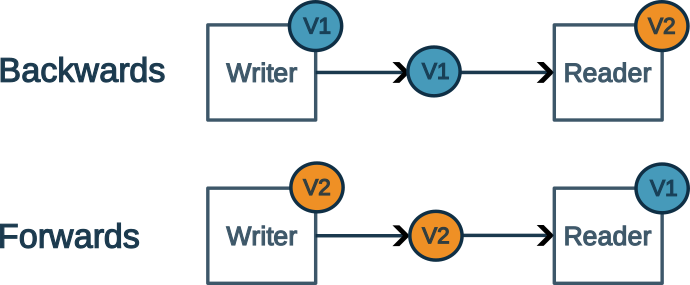
- Backward compatibility means that readers with a newer schema can correctly parse data written using an older schema.
- Forwards compatibility means that readers with an older schema can correctly parse data written using a newer schema.
ProTip: Compatibility checks matter especially in Kafka, where topics may retain data written to an older schemas for a long time. Creek checks the schemas of producers and consumers against those registered for a topic; see our schema-evolution blog series for the details.
Cost of validation
Generally, Kafka Streams applications spend the majority of their time deserialising and serialising data. With this in mind, it’s clear that the performance of a microservice, the processing rate and hence the number of instances you’ll need to run, and ultimately the cost, predominantly comes down to the efficiency of your serialization code. If we’re adding the cost of validation on both read and write to this, aren’t we going to cripple throughput?
Sure, adding validation has a cost. But in our experience, the benefits far outweigh the cost. We’ve seen highly scalable, high-throughput solutions built using schema validated JSON serialization.
So much so, that we think human-readable JSON is actually preferable to other, more efficient, binary formats, such as Avro or Protobuf. As the benefits of being able to easily inspect values during investigations and debugging outweigh the performance cost. This is why Creek shipped with JSON support before other formats.
That said, the performance is still important. Which is why we’ve compared the features and performance of the key players in the JVM based JSON schema validators space.
Comparing JVM schema validators
We compared JVM implementations in four dimensions: conformance to JSON Schema; validation and serde performance; project maintenance and dependencies; and licensing. A fast validator that doesn’t implement the parts of the specification our schemas need would not be a good choice.
The JSON Schema Validation Comparison micro-site contains the implementations under test, functional results, performance results, and other considerations. Its tables and charts are maintained separately from this article, so refer to the site for current versions and results rather than a fixed ranking here.
The functional comparison runs the community’s JSON Schema Test Suite, including cases that should pass and cases that should fail. The performance comparison uses two benchmarks:
- Validation: run the suite’s positive cases for each supported schema draft. It excludes schema parsing and validator construction, which can be amortised when the same validator is reused. Negative cases are excluded because implementations spend very different amounts of time producing useful error messages.
- Serde round trip: serialize a Java object to JSON, validate it, then validate and deserialize it back to Java. This reflects the cost of the read/write path more closely than validation alone. A Jackson round trip without validation is included as a baseline.
Compare results within a schema draft and benchmark, not raw times across drafts with different test counts or features. The benchmarks run on GitHub-hosted machines, so their results should not be read as production throughput guarantees. The comparison also considers maintenance, dependencies and licence, not just speed.
What Creek ships
Creek uses the networknt JSON Schema validator
behind its own creek-json-schema validator API.
Creek’s Kafka json-schema serde validates on both serialization and deserialization.
Schemas can be generated from Java types with the
Creek JSON Schema Gradle plugin.
The default schema-store client uses the Confluent Schema Registry; the client factory can be
overridden for another store.
This does not mean Creek’s JSON payloads are wire-compatible with Confluent’s JSON serde:
Confluent prefixes records with a schema ID, whereas Creek sends JSON without that prefix and
manages per-topic key/value schemas separately. The
json-schema format documentation
explains this distinction and the current compatibility constraints. If you are planning a
migration between serdes, verify the wire format rather than assuming that sharing a Schema
Registry makes the records interchangeable.
The outcome is schema validation at both boundaries, human-readable JSON on Kafka, and schema evolution checks before incompatible services reach production (assuming you’re deploying to other environments first). The comparison microsite is a resource for evaluating validators, not a benchmark of an entire deployed Creek service; measure your own workload before drawing conclusions about its throughput.